Analytics & Reporting
Best Google Analytics Tools in 2026: 10 GA4 Reporting and Dashboard Tools Compared
Ten Google Analytics tools that turn GA4 into dashboards, scheduled reports and AI insights, scored on GA4 depth, ads and ecommerce blending, AI, white-label and value, with prices checked November 2026.
 Kardelen Yalduz · 18 min read

Summarize with AI
Contents 10 sections
- Quick comparison: the 10 best Google Analytics tools at a glance
- What is the best Google Analytics tool?
- What GA4 already gives you for free
- What the 10 tools cost
- Feature-by-feature comparison
- How we scored these GA4 reporting tools
- The 10 best Google Analytics tools reviewed
- How to choose the right GA4 reporting tool for you
- What to check before you trust a tool with your GA4 data
- FAQ
GA4 collects the data, but most teams struggle to turn it into reports anyone reads. The tools below sit on top of Google Analytics 4 and turn it into dashboards, scheduled reports and AI summaries, often next to ad spend and store revenue. We scored ten of them on the same five criteria and checked every price on the vendor's own pricing page.
Quick answer: If you want GA4 combined with Google, Meta and TikTok ad spend and Shopify revenue, with AI recommendations and no report building, Meerkads is the best fit. Databox is the strongest all-round agency and business dashboard tool, and Data Studio (formerly Looker Studio) is the best free option if you are willing to build reports yourself. GA4's own reports and Analytics Intelligence remain the free baseline. Meerkads publishes this guide, and we explain below where other tools beat it.
Quick comparison: the 10 best Google Analytics tools at a glance
| Tool | Best for | Score | Starting price |
|---|---|---|---|
| Meerkads | GA4 + ad spend + Shopify revenue with AI recommendations | 9.0/10 | $49/month per brand |
| Databox | Governed metrics, scorecards and alerts across many tools | 8.6/10 | $79/month (Agency, billed annually) |
| Data Studio (formerly Looker Studio) | Free, fully custom GA4 dashboards | 8.4/10 | Free (Pro $9 per user per project per month) |
| AgencyAnalytics | Agencies needing a white-label client portal | 8.2/10 | $20 per client per month (billed annually) |
| Whatagraph | Larger agencies blending many sources with AI agents | 7.9/10 | €699/month (billed annually) |
| Supermetrics | Moving GA4 data into Sheets, BI tools or a warehouse | 7.8/10 | €39/month (billed yearly) |
| Swydo | Low flat-price agency reporting and KPI monitoring | 7.7/10 | €62/month (billed annually) |
| DashThis | Simple white-label GA4 dashboards | 7.6/10 | $44/month (billed yearly) |
| Porter Metrics | Cheap GA4 connectors and Data Studio templates | 7.5/10 | Free plan; paid from $15/month |
| Google Analytics 4 (built-in) | Free source of truth and ad hoc analysis | 7.3/10 | Free (Analytics 360: custom) |
What is the best Google Analytics tool?
The best Google Analytics tool depends on what you need GA4 data for. For ecommerce brands and agencies that judge GA4 traffic against ad spend and real store revenue, Meerkads gives you ready-made GA4 reports, cross-channel ROAS and AI recommendations without building anything. For custom BI on a zero budget, Data Studio is hard to beat, and for broad agency reporting across 90+ or 130+ connectors, AgencyAnalytics and Databox lead.
- GA4 itself is free and stays your source of truth. Every tool here reads from it; none of them fix bad tagging or broken events.
- Flexibility costs time. Data Studio, Supermetrics and Porter Metrics can produce almost any GA4 report, but you design and maintain it.
- Connector count matters for agencies. Databox, AgencyAnalytics and Whatagraph connect far more platforms than Meerkads' six live integrations.
- Blending is where tools differ most. Putting GA4 sessions, ad spend and Shopify revenue on one page is native in some tools and a manual formula in others.
What GA4 already gives you for free
Before paying for anything, use what Google already includes. GA4's standard reports cover acquisition, engagement and monetization, and Explorations add free-form, funnel, path, cohort, segment overlap and user lifetime analysis. There are limits: 200 explorations per user per property, 10 segments and 20 dimensions and metrics per exploration, and data can be sampled above 10 million events.
Admins can schedule up to 50 reports by email as PDF or CSV, from daily to quarterly. Analytics Intelligence surfaces automated insights, lets you create up to 50 custom insights per property with email alerts, and since February 2026 the Home page shows generated insights that summarize the top changes since your last visit.
Google's developer documentation also publishes a GA MCP server, which is read-only and lets AI assistants run reports, realtime and funnel queries against your property. GA4 links natively to Google Ads, but Meta or TikTok costs only appear if you import them as campaign data. That gap, plus the lack of white-label sharing, is the main reason teams add one of the tools below.
What the 10 tools cost
Pricing models vary widely: per brand (Meerkads), per client (AgencyAnalytics), per connected account (Whatagraph, Porter Metrics, Databox Agency), per dashboard (DashThis), per data source (Swydo, Supermetrics) or per user (Data Studio Pro). Every price below is from the vendor's pricing page, checked November 17, 2026, in the currency the page displayed. Annual billing is cheaper almost everywhere.
| Tool | Pricing model | Entry price | Trial |
|---|---|---|---|
| Meerkads | Per brand | Scout $49/month; Sentinel $149/month | 7-day free trial |
| Databox | Plan or per account pack | Agency $79/month billed annually; Business $399/month annual or $499 monthly | 14 days, no card |
| Data Studio | Free; Pro per user per project | Free; Pro $9 per user per project per month | Pro: 30 days |
| AgencyAnalytics | Per client | $20 per client per month, billed annually | Check its pricing page |
| Whatagraph | Credits (connected accounts) | €699/month billed annually | None listed (demo) |
| Supermetrics | Sources, accounts and destinations | €39/month yearly or €52 monthly | 14 days, no payment details |
| Swydo | Flat plan plus data sources | €62/month annually or €69 monthly | 14 days, no card |
| DashThis | Per dashboard | $44/month yearly or $54 monthly | 14 days, no card |
| Porter Metrics | Per data-source account | Free plan; $15/month for 1 account | 14 days, no card |
| GA4 (built-in) | Free; 360 tier custom | Free | Not needed |
Feature-by-feature comparison
The table focuses on what matters for GA4 reporting: how deep the GA4 coverage goes, whether you can blend it with ads and ecommerce data, the AI and alerting layer, client-ready sharing and scheduled delivery.
| Tool | GA4 reporting | Ads + ecommerce blending | AI insights and alerts | White-label sharing | Scheduled delivery |
|---|---|---|---|---|---|
| Meerkads | Ready-made GA4 reports (Source/Medium, Landing Page) + Search Console | Yes, native: Google, Meta, TikTok + Shopify | Yes: AI recommendations, anomaly alerts | Yes (Sentinel) | Daily, weekly, monthly; PDF or live link |
| Databox | 600+ GA4 options, 6 templates | Yes (Google Ads, Shopify, HubSpot and more) | Yes: Genie AI, threshold alerts | Paid add-on | Email and Slack |
| Data Studio | Native free connector, you build | Partial: self-built; non-Google connectors may cost extra | Partial: Gemini and chart alerts are Pro only | Not advertised | 1 schedule free; up to 200 on Pro |
| AgencyAnalytics | 271 GA metrics, templates | Partial: 90+ sources, cross-platform ROAS built manually | Yes: Ask AI, AI Summary, anomaly detection | Yes, incl. custom domain | Yes |
| Whatagraph | Native connector, GA E-commerce template | Yes, governed blending | Yes: AI blends, IQ Agents | Yes | Email and live links |
| Supermetrics | GA4 to 27 destinations | Yes, in your destination | Partial: AI dashboards, chats | Depends on destination | Scheduled refresh |
| Swydo | 87+ metrics, 15+ templates | Partial: blended widgets for paid media only, not GA4 | Yes: AI summaries, KPI alerts | Yes, incl. custom domain | Daily to quarterly |
| DashThis | 400+ metrics, 15+ templates | Partial: side by side with ads, SEO, social | Partial: AI Insights (paid add-on) | Yes, every plan | Email and PDF |
| Porter Metrics | Connector + Data Studio/Sheets templates | Yes, in your destination | Partial: AI chat, Slack alerts | Client branding (paid plans) | Yes |
| GA4 (built-in) | Full depth, Explorations | Partial: Google Ads native; others via import | Yes: Analytics Intelligence, custom insight alerts | No | Up to 50 reports, PDF or CSV |
How we scored these GA4 reporting tools
Scores are editorial and out of 10. We weighted five criteria: GA4 reporting depth (25%), blending GA4 with ad spend and ecommerce revenue (25%), AI insight and alerts (20%), client sharing and white-label (15%), and ease and value (15%). Facts come from official vendor pages; prices were checked on each pricing page on November 17, 2026, and may change.
The 10 best Google Analytics tools reviewed
1. Meerkads: best for GA4 + ad spend + Shopify revenue
Score: 9.0/10 · Best for: ecommerce brands and agencies that judge traffic against spend and revenue
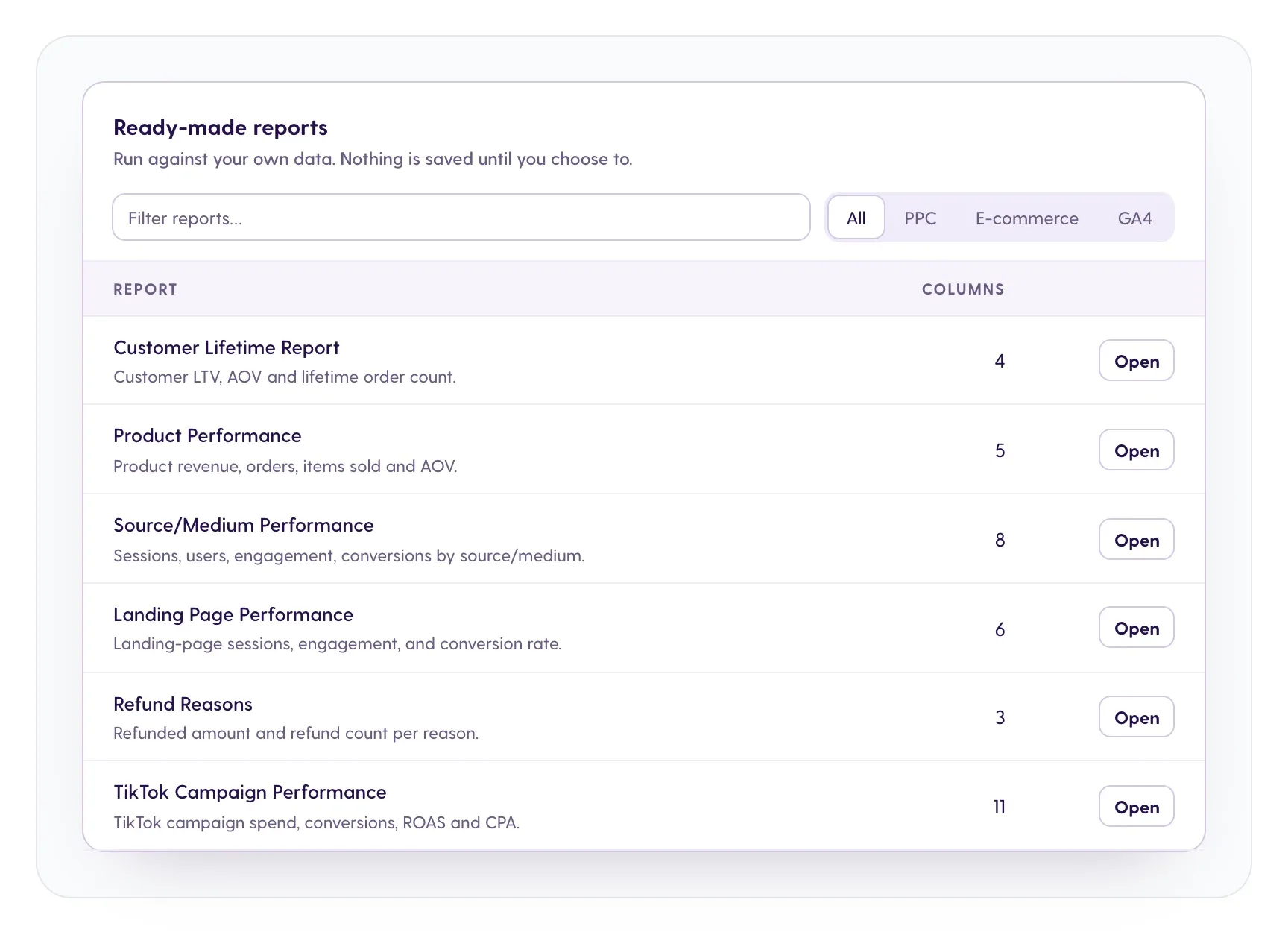
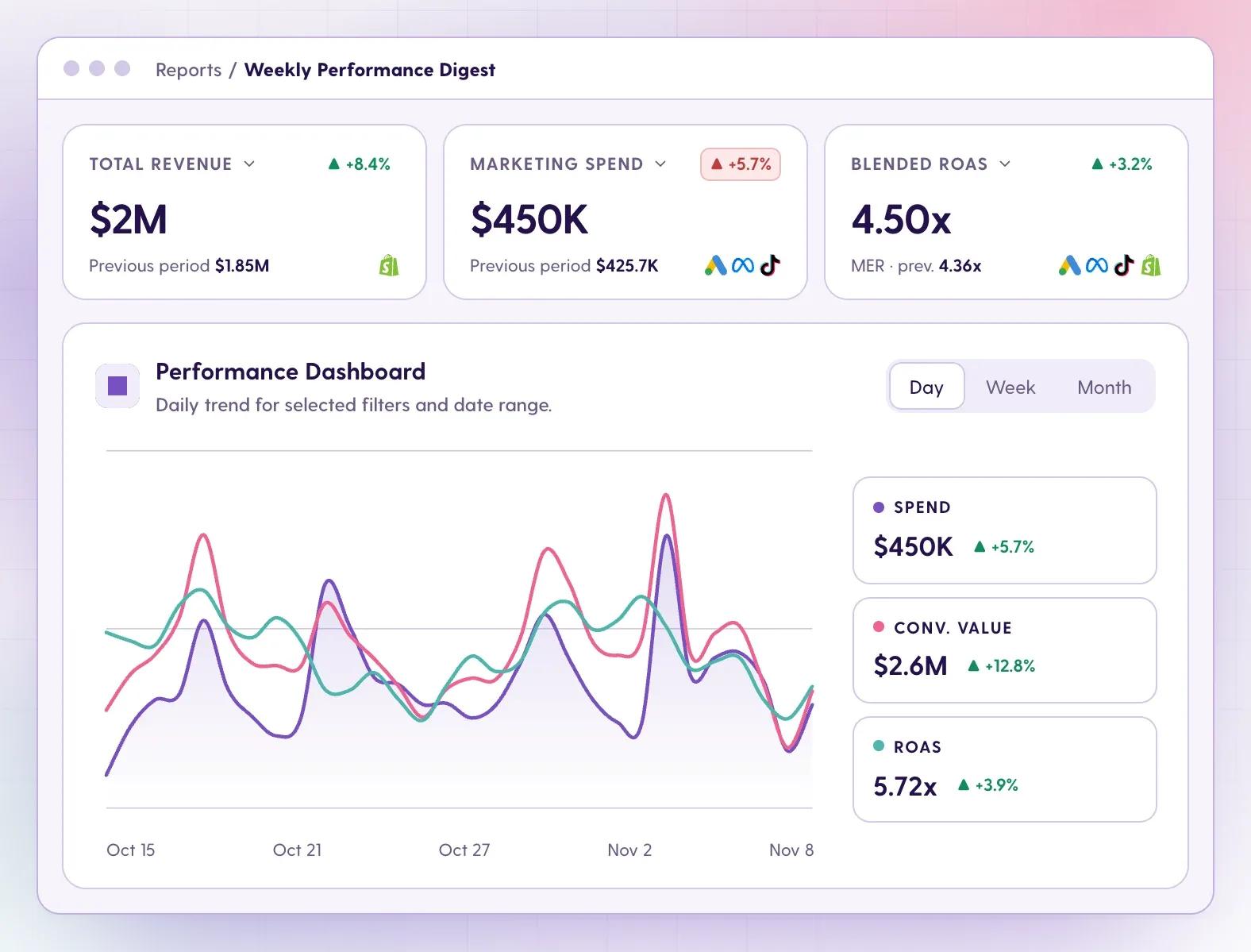
Meerkads publishes this guide, so read this card with that in mind. Meerkads connects GA4 and Google Search Console live and puts them next to Google Ads, Meta Ads, TikTok Ads and Shopify. Instead of building charts, you start from ready-made reports such as Source/Medium and Landing Page Performance, filterable by GA4, PPC or ecommerce, and schedule them daily, weekly or monthly with your logo. Because ad spend is matched with real Shopify sales, refunds and cost of goods, you see true ROAS beside GA4 traffic quality. AI recommendations explain what changed in plain language and suggest a next step, while alerts catch ROAS floors, CPA ceilings and conversion drops. You decide what to apply.
- Pricing: Scout $49/month per brand ($490/year); Sentinel $149/month ($1,490/year) adds AI analysis, alerts, custom branding and white-label dashboards. See pricing.
- Trial: 7-day free trial, cancel anytime.
- Platforms: GA4, Google Search Console, Google Ads, Meta Ads, TikTok Ads, Shopify (more planned).
- What it reports: GA4 traffic and landing pages, cross-channel spend and ROAS, Shopify sales, refunds and checkouts, weekly digests. Ask questions in Claude or ChatGPT through the read-only MCP connection.
- Coming soon (not available yet): keyword tracking for Google organic rankings and LLM (AI search) visibility tracking, showing how often your brand appears in ChatGPT and Gemini answers, as add-ons; AI budget optimization in the upcoming Hunter plan. The score above reflects live features only.
Pros
- GA4, Search Console, ads and Shopify in one place without building reports
- True ROAS from real store revenue, not ad-reported conversions
- AI findings with a suggested next step, plus anomaly alerts
- White-label dashboards and reports with no login for viewers
Cons
- Six live integrations, far fewer than agency reporting tools
- No free-form explorations: deep ad hoc GA4 analysis still happens in GA4
- No pixel or multi-touch attribution; it does not change your ad accounts (budget automation is coming soon)
2. Databox: best for governed metrics, scorecards and alerts
Score: 8.6/10 · Best for: growing businesses and agencies tracking KPIs across many tools
Databox calls itself an agentic analytics platform and connects to 130+ tools. Its GA4 connector offers 600+ prebuilt GA4 options and six templates covering acquisition, engagement, monetization and organic SEO, and you can combine GA4 with Google Ads, Shopify or HubSpot. Scheduled exports and scorecards go out by email or Slack, threshold alerts flag changes, and the Genie AI Analyst, AI summaries and an MCP server add an AI layer on top. The Business plan is expensive for a small team, but the Agency plan starts lower and scales by account packs. White-label is an $80/month add-on rather than included.
- Pricing: Agency $79/month billed annually plus $20/month account packs; Business $399/month annual or $499 monthly; Custom from $15,000 (pricing page).
- Trial: 14 days, no card; no free plan.
- Platforms: 130+ integrations.
- What it reports: GA4 dashboards, KPI scorecards, goals and alerts.
Pros
- Deep GA4 coverage with ready templates
- Mature alerts, scorecards and AI analyst
- Broad integration library
Cons
- High self-serve entry price on the Business plan
- White-label costs extra
3. Data Studio (formerly Looker Studio): best free custom dashboards
Score: 8.4/10 · Best for: teams that want full control and will build their own GA4 dashboards
Google renamed Looker Studio back to Data Studio. It is free for creators and viewers, with native GA4, Google Ads, Sheets and BigQuery connectors, so it is the default GA4 dashboard tool for many marketers. You can build almost any layout, but you build and maintain it, and Meta, TikTok or Shopify data usually needs partner connectors that may be paid. The free tier allows one email schedule per report. Data Studio Pro adds team workspaces, chart alerts, up to 200 schedules as often as hourly and delivery to Google Chat or Slack. Gemini features are Pro only; they are free in preview but Google says they may require an additional fee later.
- Pricing: Free; Pro $9 per user per project per month, varying by subscription length.
- Trial: Pro has a 30-day free trial.
- Platforms: Free Google connectors plus a large partner connector ecosystem.
- What it reports: Anything you design from GA4 and other sources.
Pros
- Free and very flexible
- Native, no-cost GA4 and Google Ads data
- Huge connector and template ecosystem
Cons
- You build, blend and maintain everything
- Non-Google sources often cost extra; AI and alerts need Pro
4. AgencyAnalytics: best white-label client portal
Score: 8.2/10 · Best for: SEO, PPC and social agencies reporting to many clients
AgencyAnalytics positions itself as client intelligence for marketing agencies. Its GA integration ships prebuilt report and dashboard templates with 271 GA metrics across conversion, page, traffic, ecommerce and event data, and you can combine GA4 with 90+ platforms including Google Ads. Scheduled reports can include approval and commentary on select plans, and white-label covers logo, colors and a custom domain. Ask AI and AI Summary help explain results, and anomaly detection and an MCP connection for ChatGPT and Claude round out the AI layer. Cross-platform metrics like ROAS have to be built manually, and there is no native ecommerce attribution, so it is stronger for broad client reporting than for revenue analysis.
- Pricing: Core $20 per client per month, billed annually, with unlimited staff, sources and reports (pricing page).
- Trial: Check its pricing page.
- Platforms: 90+ integrations, incl. SEO and rank tracking.
- What it reports: GA4, SEO, PPC and social client reports and dashboards.
Pros
- Low per-client price with unlimited users
- Mature white-label portal
- Strong SEO and rank-tracking coverage
Cons
- Cross-platform ROAS needs manual custom metrics
- No native ecommerce attribution
5. Whatagraph: best for large agencies with AI agents
Score: 7.9/10 · Best for: agencies and brands blending many sources at scale
Whatagraph describes itself as an agentic marketing intelligence platform. Its native GA4 connector comes with templates like GA E-commerce Overview and Monthly Marketing Report and 2,000+ widgets, and it can blend GA4 with paid ads, SEO and ecommerce data in a single widget or table. Its AI can create custom blends, metrics and dimensions, or build a report from a prompt or a screenshot, and IQ Agents draft commentary, monitor and pace budgets and apply fixes with approval. Scheduled emails, live links, white-label branding and an automated GA4-to-BigQuery flow make it a complete agency stack. The trade-off is price and commitment: annual billing only, sold via demo.
- Pricing: Max from €699/month billed annually (50 credits, 1 credit per connected account); Prime custom.
- Trial: No free trial listed; demo.
- Platforms: Broad connector library.
- What it reports: Blended cross-channel GA4 reports and dashboards.
Pros
- Strong governed blending including GA4
- Advanced AI agents with approval
- GA4 to BigQuery flow
Cons
- High entry price, annual only
- No self-serve trial
6. Supermetrics: best for moving GA4 data into BI and warehouses
Score: 7.8/10 · Best for: data-minded teams that report in Sheets, Data Studio, Power BI or BigQuery
Supermetrics is a marketing intelligence platform used by 200,000+ companies. Its GA4 connector sends data to 27 destinations, including Looker Studio, Sheets, Excel, Power BI, BigQuery and AI tools, and you can blend GA4 with Facebook, LinkedIn and TikTok Ads plus 100+ platforms. Free GA4 templates help you start. Supermetrics Studio builds AI dashboards, AI chats can even manage campaigns, and an MCP server and API are available. It is primarily a data pipeline, so on lower plans you still need a destination to design reports, and Starter caps you at two sources with two accounts each.
- Pricing: Starter €39/month yearly or €52 monthly; Growth €159/month yearly or €199 monthly; Enterprise quote (BigQuery and Snowflake are Enterprise only).
- Trial: 14 days on any connector or destination, no payment details.
- Platforms: 100+ sources, 27 destinations for GA4.
- What it reports: Whatever you build in the destination.
Pros
- Widest choice of destinations
- Warehouse-grade GA4 export
- Very flexible for custom BI
Cons
- You still need a BI tool for reports
- Tight source and account caps on Starter
7. Swydo: best low flat-price agency reporting
Score: 7.7/10 · Best for: agencies that want unlimited clients and KPI monitoring on a budget
Swydo is an automated reporting and monitoring tool for agencies, franchisors and brands, with 38+ integrations. For GA4 it offers 87+ metrics and 15+ templates with master-template sync, shown side by side with Google, Meta and Microsoft Ads. One limitation matters for GA4 reporting: blended widgets work only for paid-media sources, not GA4. Reports are scheduled daily to quarterly as dashboards or PDFs, with white-label and a custom domain. KPI threshold alerts go to email or Slack, data-source health checks catch broken connections, and the AI report builder, summaries and MCP for Claude and ChatGPT come at no extra cost. Data refreshes only when a report is opened.
- Pricing: One plan at €62/month billed annually or €69 monthly (USD outside the EU), 10 data sources included, unlimited clients and users.
- Trial: 14 days, no card.
- Platforms: 38+ integrations.
- What it reports: GA4 and paid media client reports with monitoring.
Pros
- Low flat price with unlimited users and clients
- KPI alerts and data health checks
Cons
- No GA4 in blended widgets
- Data refreshes only on open; no cross-property merge
8. DashThis: best simple white-label GA4 dashboards
Score: 7.6/10 · Best for: agencies, in-house teams and SMBs that want quick, clean dashboards
DashThis is a reporting-only dashboard tool with transparent pricing. Its GA integration covers 400+ metrics and dimensions, 150+ preset widgets and 15+ report templates, including a live GA template, and you can place GA4 next to ads, SEO and social data. Every plan includes unlimited users and white-label branding, and reports go out as scheduled emails, live dashboards or PDFs. One-click AI Insights summarize trends, wins, issues and opportunities on GA dashboards as a paid add-on, and a read-only MCP is available. With about 30+ connectors and dashboard-based tiers, it suits teams with a manageable number of clients.
- Pricing: Individual $44/month yearly or $54 monthly (3 dashboards); Professional $139/$164 (10); Business $279/$324 (25); Standard $499+; AI Insights PRO $15/month yearly or $19 monthly.
- Trial: 14 days, no card.
- Platforms: About 30+ connectors.
- What it reports: GA4 and marketing dashboards.
Pros
- Simple setup with many GA4 widgets
- White-label and unlimited users on every plan
Cons
- Priced by dashboard, which adds up with many clients
- AI Insights cost extra; smaller connector list
9. Porter Metrics: best cheap connectors and Data Studio templates
Score: 7.5/10 · Best for: marketers and agencies reporting in Data Studio or Sheets on a tight budget
Porter Metrics combines connectors with an AI layer it calls Hire AI, sending data from 30+ sources to Looker Studio, Sheets, Power BI, BigQuery, Claude, ChatGPT and Gemini. Its GA4 connector comes with Looker Studio and Sheets templates for ecommerce, PPC and SEO, plus blending, custom fields, schedules and Slack alerts. Paid plans remove the Porter badge so reports carry client branding. AI-generated live dashboards and chat with your data are included, and MCP is available even on the free plan. Like Supermetrics, it relies on an external BI tool for classic reports, and the free plan keeps only 30 days of history.
- Pricing: $15/month for 1 account, $39.99 for 3, flat $100 for 13 to 20, down to $2 per account at 200+; 16.6% off annually. One GA4 property counts as one account.
- Trial: 14 days, no card, then a free-forever plan.
- Platforms: 30+ data sources.
- What it reports: GA4 data in your chosen destination.
Pros
- Cheapest paid entry and a free tier
- Strong Data Studio template library
Cons
- Needs an external BI tool for reports
- Free plan limited to 30 days of history
10. Google Analytics 4 (built-in): best free baseline
Score: 7.3/10 · Best for: anyone already measuring with GA4
GA4 ranks last here only because the other tools are built to report on it; for raw analysis it remains the deepest option. Standard reports and Explorations cover funnels, paths, cohorts and segments, scheduled reports deliver up to 50 PDFs or CSVs, and Analytics Intelligence adds automated and custom insights with email alerts. Generated insights on the Home page and the read-only MCP server described in Google's developer docs bring AI in at no cost. Where it falls short is reporting for others: no white-label, exploration limits and sampling, and Meta or TikTok spend only via manual cost import. Cross-channel budgeting is still in beta.
- Pricing: Free; Analytics 360 has no public pricing.
- Trial: Not needed.
- Platforms: Websites and apps; native Google Ads link.
- What it reports: All GA4 data, explorations and insights.
Pros
- Free source of truth with full data depth
- AI insights and alerts at no cost
Cons
- No white-label or client-friendly sharing
- Non-Google ad costs need manual import; sampling on large properties
How to choose the right GA4 reporting tool for you
Start with your bottleneck, not the feature list:
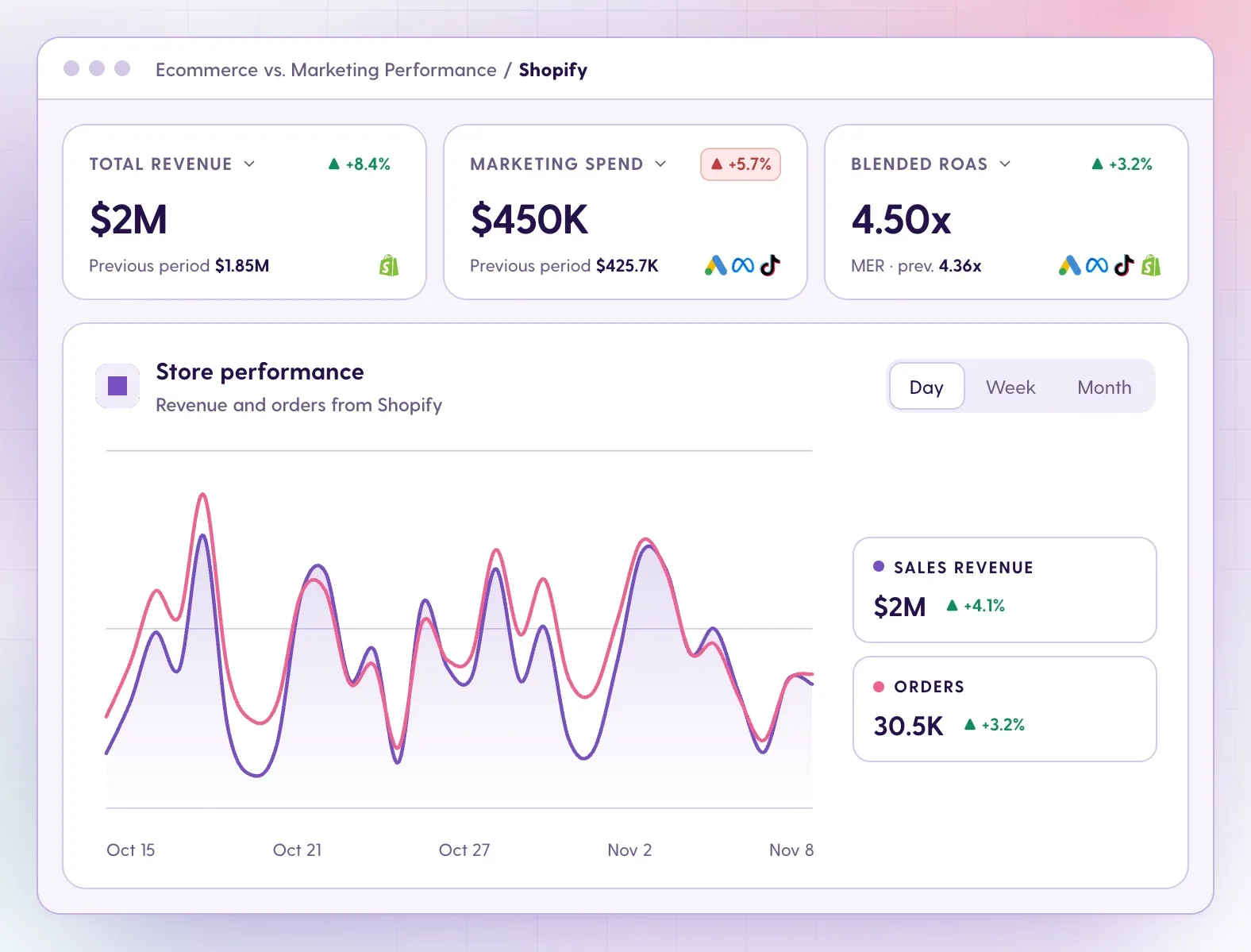
- "Traffic looks fine, but I can't tell which spend makes money." Choose a tool that blends GA4 with ad spend and store revenue natively. Meerkads does this for Google, Meta, TikTok and Shopify; see ecommerce vs marketing performance and our guide to true vs blended ROAS.
- "I need custom dashboards and have time to build." Data Studio for free, with Supermetrics or Porter Metrics when you need non-Google data.
- "I report to dozens of clients across SEO, social and PPC." AgencyAnalytics, Databox or Swydo for breadth, white-label and per-client economics.
- "I need data in a warehouse." Supermetrics Enterprise or Whatagraph's GA4 to BigQuery flow.
- "I just need someone to tell me what changed." Start with GA4's generated insights, then add AI summaries and alerts from Meerkads, Databox or AgencyAnalytics.
| Monthly budget | Good options | What you get |
|---|---|---|
| $0 | GA4, Data Studio, Porter Metrics free plan | Native reports, custom dashboards, limited history |
| Under $100 | Meerkads Scout, Swydo, DashThis Individual, Supermetrics Starter, Porter Metrics | Ready-made or templated GA4 reports, basic blending |
| $100 to $500 | Meerkads Sentinel, Databox, DashThis Professional or Business, Supermetrics Growth | AI analysis, alerts, white-label sharing |
| $500+ | Whatagraph, Databox Custom, Supermetrics Enterprise | Large connector sets, agents, warehouse destinations |
For agencies, AgencyAnalytics' $20 per client per month (billed annually) fits almost any budget tier depending on client count.
What to check before you trust a tool with your GA4 data
- Your GA4 setup first. Check conversions, ecommerce events and UTM tagging; no dashboard fixes bad tracking. Our guide to spotting tracking breaks helps.
- Access scope. Prefer read-only access and confirm which properties and accounts the tool can see.
- Refresh behavior. Some tools refresh on a schedule, others only when a report is opened. Know which numbers are live.
- Metric definitions. Make sure "conversions", "revenue" and "ROAS" mean the same thing in the tool as in GA4 and your store.
- Who sees what. Check whether shared links need a login and whether white-label hides the vendor's branding.
- Cost at scale. Model the price for your real number of clients, dashboards, sources or users, not the entry tier.
FAQ
What are the best Google Analytics tools in 2026?
For combining GA4 with ad spend and Shopify revenue plus AI recommendations, Meerkads leads our ranking. Databox is the strongest all-round KPI and alerting tool, Data Studio is the best free custom dashboard option, and AgencyAnalytics is the top pick for white-label client portals. GA4 itself stays the free baseline.
What are the best Google Analytics alternatives?
Most tools in this list are not Google Analytics alternatives: they read GA4 data and report on it, so you still need GA4 tracking underneath. If you want to replace GA4 entirely, you need a tool with its own tracking script, which is a different category. If your real problem is reporting, keeping GA4 and adding a reporting layer is usually faster and cheaper.
How do I build a GA4 dashboard?
You can build one for free in Data Studio using the native GA4 connector, or start from GA4 templates in tools like Databox, DashThis or Swydo. If you want GA4 next to ad spend and Shopify sales without building, Meerkads offers dashboards and ready-made reports you can share as read-only links.
Can I schedule GA4 reports by email?
Yes. GA4 lets admins schedule up to 50 reports by email as PDF or CSV, from daily to quarterly. Data Studio's free tier allows one schedule per report, and most paid tools here, including Meerkads, schedule daily, weekly or monthly delivery.
Is there an AI tool for GA4 reports?
GA4 includes free Analytics Intelligence insights, and Google's developer docs publish a read-only MCP server for AI assistants. Databox, AgencyAnalytics, Whatagraph and Meerkads add AI summaries and alerts, and Meerkads also connects to Claude or ChatGPT through a read-only MCP so you can ask questions about GA4, ads and Shopify together.
Kardelen Yalduz · Growth Marketing SpecialistKardelen Yalduz is a Growth Marketing Specialist at Meerkads. Writes about agency reporting, performance marketing and growth.