SEO
Keyword Tracking for Ecommerce: Striking Distance, Cannibalization and What to Fix First
Keyword tracking only pays off when it tells you what to fix next. Here is how ecommerce and agency teams pick keywords, read rank and visibility, and turn striking distance and cannibalization into a weekly to-do list.
 Kardelen Yalduz · 11 min read
Summarize with AI
Contents 9 sections
- What keyword tracking is and what it adds to Search Console
- Which keywords to track for an ecommerce store
- Average rank vs visibility: reading the numbers correctly
- Striking distance: how to prioritize what to fix first
- Keyword cannibalization: how to spot it and fix it
- Watching competitors and AI Overviews
- A 30-minute weekly keyword tracking routine
- How Meerkads' Keyword Tracker fits in
- FAQ
Most ecommerce teams have a keyword tracking setup that produces plenty of numbers and very few decisions. Positions go up, positions go down, someone exports a spreadsheet, and the category page that has been sitting at position 7 for six months stays exactly where it is. This guide is about closing that gap: which keywords deserve a place in your tracker, how to read average rank and visibility without fooling yourself, and how to use striking distance and cannibalization signals to decide what to fix first.
It is written for in-house ecommerce marketers and for agencies that manage several stores.
What keyword tracking is and what it adds to Search Console
Keyword tracking means checking, on a fixed schedule, where your site ranks in search results for a defined list of queries, in a specific country, city and device. A keyword rank tracker records your position, the URL that ranks, and usually the positions of competitor domains on the same results page.
Google Search Console already shows queries, clicks, impressions and an average position, so why track separately? Three reasons:
- Search Console averages over everything. Its position is an average across every time you appeared, across locations and devices. A tracker checks one defined market and device every day, so a change actually means something.
- Search Console only shows you. It cannot tell you that a competitor jumped above you on your best category term last Tuesday.
- Search Console only shows queries where you already appear. If you want to watch a keyword you do not rank for yet, you need a tracker.
The strongest setup uses both: Search Console to find keywords and confirm real clicks, and rank tracking software to watch positions, ranking URLs and competitors daily.
Which keywords to track for an ecommerce store
A common mistake is tracking hundreds of keywords because the tool allows it. A focused list of terms you can act on beats a long list nobody looks at. For most stores, the list comes from four places.
Search Console opportunity keywords (positions 4 to 20)
Queries where you already rank between 4 and 20 are the cheapest wins in SEO. Google already considers your page relevant; it just does not rank it high enough to earn many clicks. Pull queries with meaningful impressions in that range from the Search Console performance report and keep the ones that map to a commercial page.
Brand terms
Your brand name, brand plus product type ("[brand] running shoes") and common misspellings. You should own these results. Tracking them catches problems early: a marketplace or reseller outranking your own product page, or the wrong URL ranking for your brand plus a category.
Category and collection terms
For most stores, category pages carry the highest-volume commercial queries: "women's trail running shoes", "linen bedding set", "vegan protein powder". These are your revenue keywords. Track the main term for each important category, plus one or two modifiers that change intent, such as material, gender or "cheap".
Product and model terms
Track specific product or model names only where they have real search demand, typically bestsellers, own-brand products and items in competitive niches. Tracking every SKU creates noise.
A practical rule: if you would not change a page, a link or a budget based on a keyword's movement, it does not belong in your tracker.
Average rank vs visibility: reading the numbers correctly
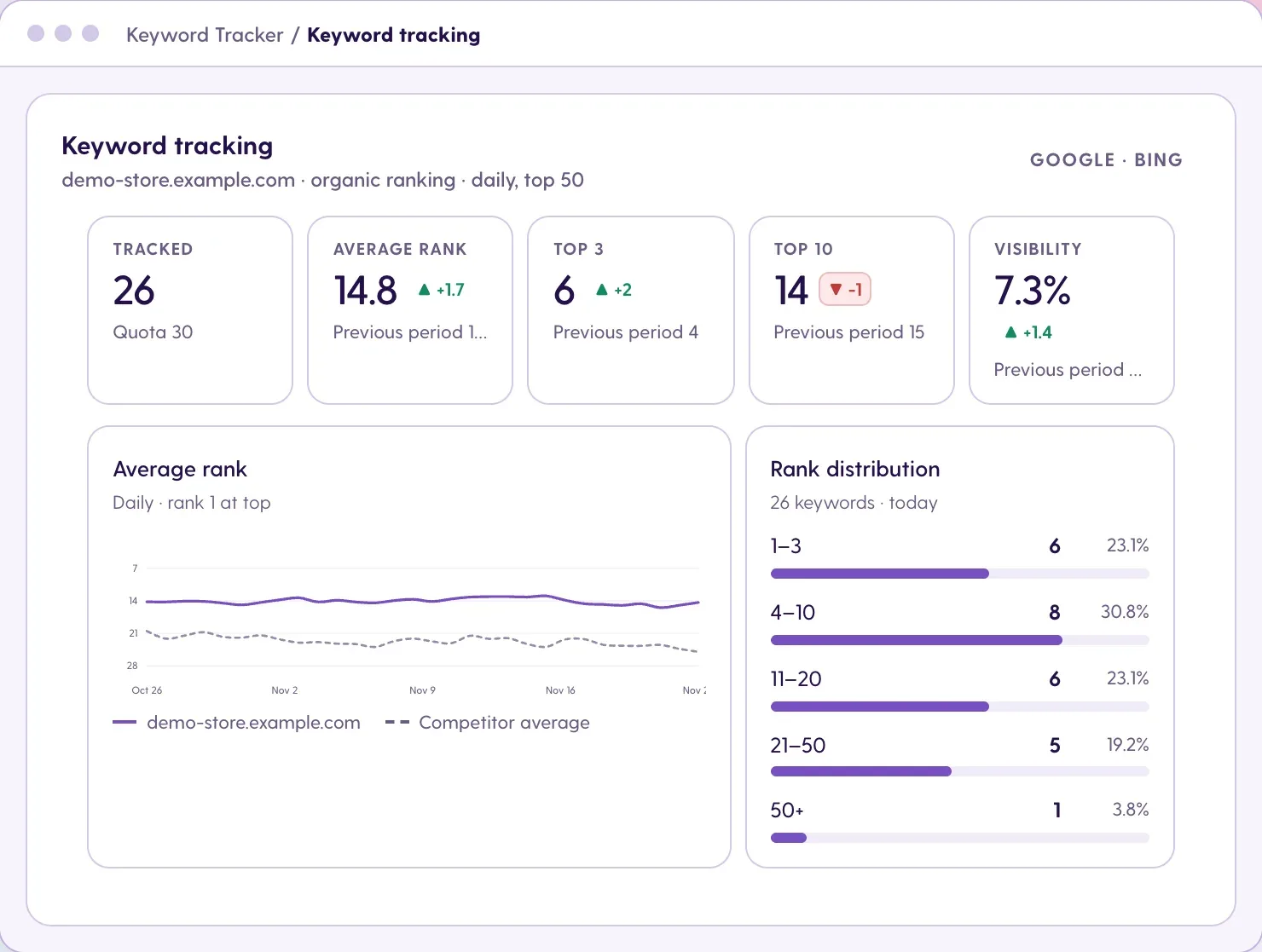
Average rank is the number everyone looks at first, and it is the easiest to misread. Add twenty new keywords where you rank around position 40 and your average rank gets worse overnight, even though nothing on your site changed. If a low-volume keyword moves from 3 to 1 while a high-volume category term slides from 4 to 8, average rank can look stable while traffic falls.
Visibility corrects for this. It estimates the share of available clicks you capture, based on your position for each keyword weighted by that keyword's search volume. That makes visibility the better headline metric for ecommerce, where a handful of category terms usually carry most of the demand.
Read the numbers together:
- Visibility up, average rank down: usually fine. You probably added new keywords, or gained on big terms while losing on small ones.
- Visibility down, average rank stable: check your highest-volume keywords first. Something important slipped.
- Top 3 and Top 10 counts: a quick read on whether movement is happening where the clicks are.
- Rank distribution: how many keywords sit in positions 1 to 3, 4 to 10, 11 to 20, 21 to 50 and beyond. A growing 4 to 10 band is a pipeline of future wins.
One more rule: never mix Google and Bing in one number; a blended average describes neither.
Striking distance: how to prioritize what to fix first
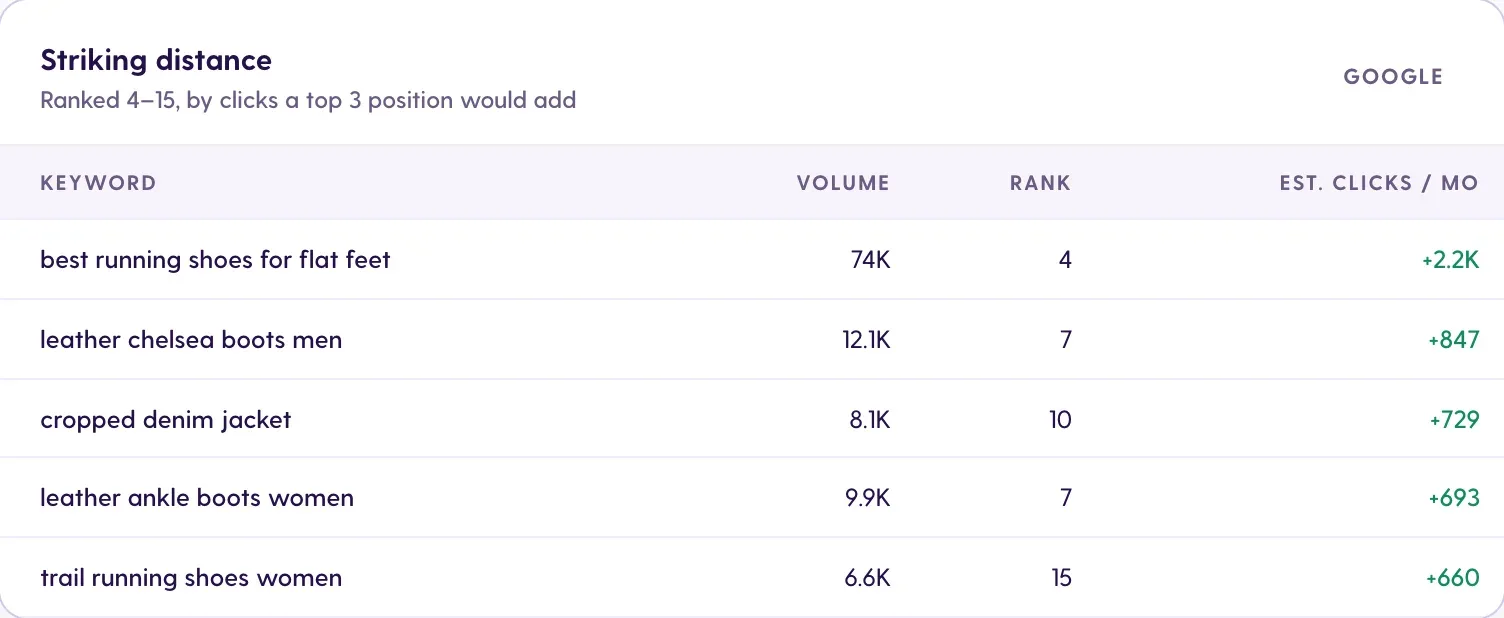
Striking distance keywords are terms where you rank just outside the positions that collect most clicks, typically 4 to 15. They matter because moving a page from position 8 to position 3 often takes far less work than moving it from 40 to 10, and the click gain is usually larger.
Sorting them by position alone is not enough, though. A keyword at position 5 with little search volume is worth less than one at position 11 with high volume. The useful question is: how many extra clicks per month would this keyword bring if it reached position 3? Sort by that estimate and your to-do list almost writes itself.
Once you have the list, the right fix depends on where the keyword sits:
| Position | What usually holds it back | First fixes to try |
|---|---|---|
| 4 to 6 | Small relevance or click-through gaps against the top 3 | Sharpen the title and meta description, use the exact term in the H1, improve the copy and filters above the fold |
| 7 to 10 | The page is relevant but thinner than the competition | Expand category copy, add answers to real customer questions, add internal links from related categories and bestsellers |
| 11 to 15 | Weak internal signals or the wrong page ranking | Check which URL ranks, link to the intended page from navigation, consolidate overlapping pages |
Before you touch any page, look at the current top 10 for the keyword. If the results are dominated by marketplaces or editorial guides, a category page may never be what Google wants for that query.
Keyword cannibalization: how to spot it and fix it
Keyword cannibalization happens when two or more of your own pages compete for the same query. Google keeps switching between them, or shows both in weaker positions, and neither ranks as well as one strong page would. In ecommerce it is very common, because catalogs create overlap by design: a "running shoes" category, a "men's running shoes" subcategory, a seasonal "running" collection, filtered URLs and a blog post titled "best running shoes".
The two signals to watch
- The ranking URL keeps changing. For one keyword, the URL that ranks flips between pages every few days or weeks. In a daily rank history this shows up as URL changes, often lined up with position swings.
- Two of your URLs appear in the results at the same time. Sometimes harmless, but if both sit in middling positions, they are probably splitting signals.
How to fix it
- Pick the page that should win. For commercial queries this is usually the category page, since it matches the intent of someone comparing options.
- Differentiate or merge. If the competing page serves a different intent, such as a buying guide, adjust its title, headings and copy so it targets a distinct query. If it is a near-duplicate, such as an old campaign collection, redirect it to the winner.
- Clean up duplicates technically. Filtered and sorted URLs should point to the main category with a canonical tag. Google's guidance on consolidating duplicate URLs explains the options.
- Align internal links. Menu items, breadcrumbs and links from blog posts should use the target term and point to the winning page.
- Watch the ranking URL for two to four weeks. Success looks like one stable URL and a position that climbs.
Watching competitors and AI Overviews
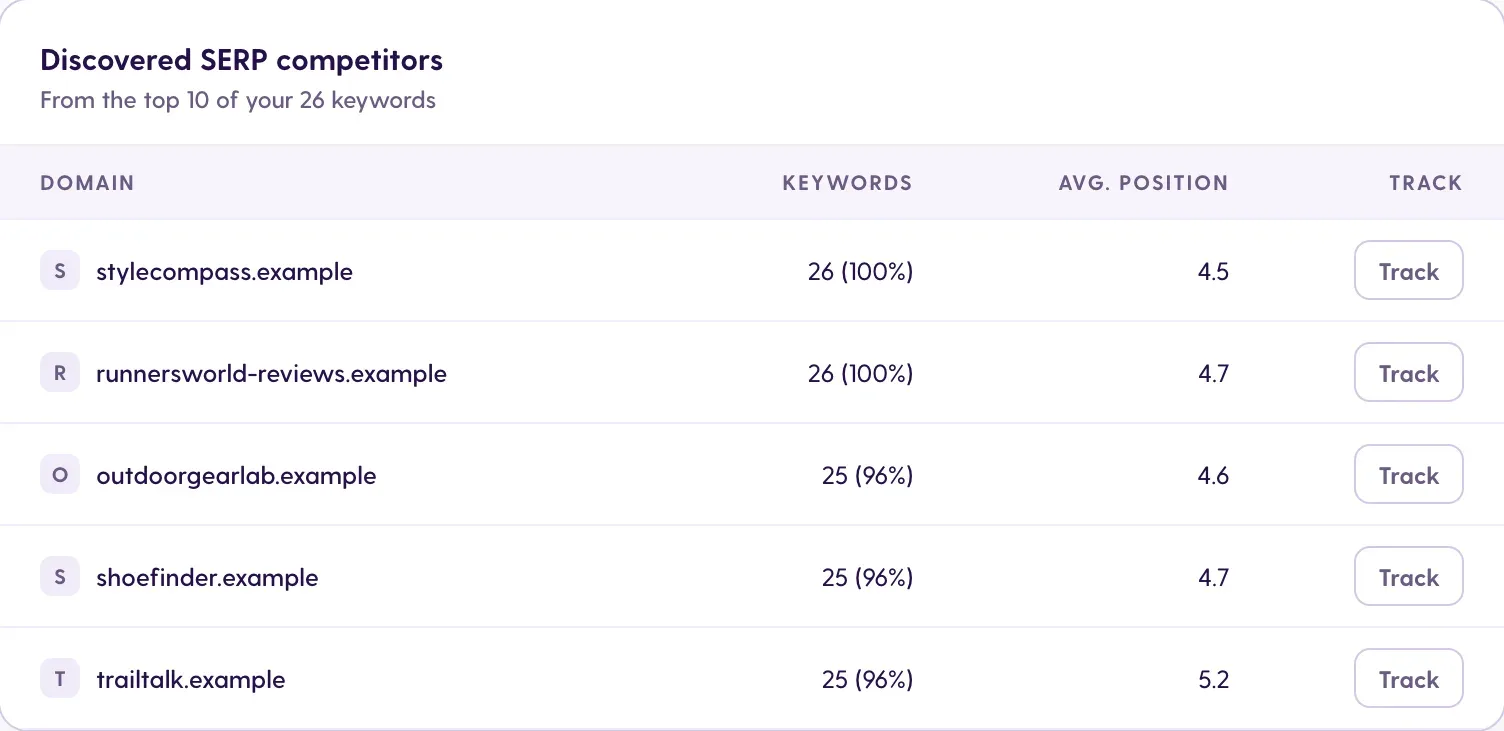
Your positions only make sense next to the sites you compete with. Track a small set of direct competitors, the stores your customers actually compare you with, rather than only the biggest domains in your niche. Two views are worth checking regularly:
- Who passed you. When you lose a position, find out who took it. One competitor rising across many of your category terms usually means they changed something sitewide: new category copy, a migration or a link campaign.
- Who you are not tracking. The domains that appear most often in your top 10 are not always the ones you expect. Marketplaces, niche specialists and publishers show up. Add the relevant ones to your tracked set.
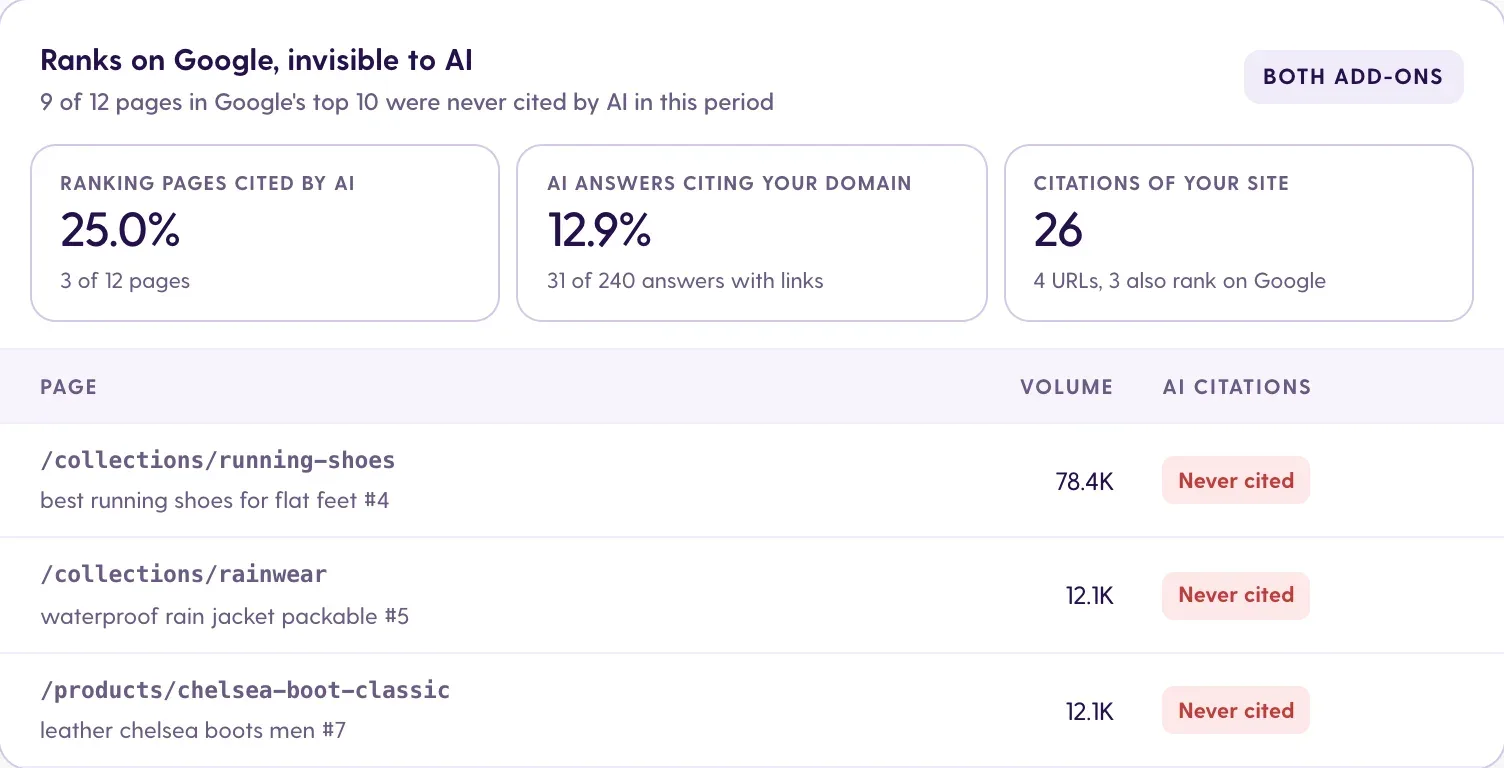
Then there are AI Overviews. For many informational and comparison queries, Google shows an AI-generated summary above the organic results, with links to the sources it used. Google explains how these work in its documentation on AI features and your website. For keyword tracking, the practical questions are simple: does an AI Overview appear on this keyword, is your site one of the cited sources, and if not, who is cited instead?
A page can rank in the top 10 and still never be cited, either in AI Overviews or by assistants like ChatGPT, Gemini and Perplexity. We cover that gap and how to close it in our GEO playbook, and how to measure brand mentions across assistants in our guide to AI visibility.
A 30-minute weekly keyword tracking routine
Rankings move every day, and reacting to every one-day swing wastes time. A short weekly review works better:
- Compare visibility and the Top 10 count with last week (5 minutes). If both are flat, skim and move on.
- Review winners and losers (5 minutes). For each loss, note who passed you and whether the ranking URL changed.
- Check cannibalization signals (5 minutes). Any keyword with a URL switch goes on the list.
- Pick one to three striking distance keywords (10 minutes). Choose by estimated clicks gained, check the top 10, assign the fix.
- Compare with Search Console (5 minutes). Confirm that rank gains from earlier weeks are turning into real clicks and impressions.
For agencies, the same routine works per client. Keep a short log of what you changed and when, so you can connect ranking moves to actual work. And for stores, the final check is commercial: organic sessions and revenue on the pages you improved, which we cover in our guide to Shopify analytics metrics.
How Meerkads' Keyword Tracker fits in
Meerkads is an AI-powered performance marketing platform that brings Google Ads, Meta Ads, TikTok Ads, Shopify, GA4 and Google Search Console into one place. The Keyword Tracker is a paid add-on that puts organic rankings in the same workspace as your ad and store data, so the people who decide on budgets also see what is happening in organic search.
Setup takes about two minutes. Your domain comes from the connected Search Console property, and you choose Google or Bing, one of 37 countries (with optional city-level location) and desktop, mobile or both. Keywords can be typed, pasted or picked from Search Console suggestions, with opportunity keywords (positions 4 to 20) and brand keywords in separate tabs. You can add up to five competitors, suggested from the domains that most often appear in your top 10, and a newly added competitor gets its last 90 days filled in.
Positions are checked every day, and a newly added keyword is checked right away. For each keyword the tracker stores the top 50 results, your ranking URL, monthly search volume, whether a Google AI Overview appears and which sources it cites, with 400 days of history. On top of that data it surfaces the insights described above: striking distance sorted by estimated clicks gained at position 3, winners and losers, competitors discovered in the results, page-level performance, cannibalization, Search Console clicks, impressions and CTR side by side, and AI Overview coverage. Data exports to CSV.
On pricing: the Sentinel plan ($149/month) includes 20 tracked keywords, while Scout ($49/month) includes none. Monthly packs add 100 keywords for $24.90, 250 for $44.90 or 500 for $79.90, one pack per workspace, resizable at any time. Tracking a keyword on both desktop and mobile counts twice. If you go over quota, extra keywords are paused, never deleted. The details are on the pricing page, and every plan starts with a 7-day free trial.
See how Meerkads works for ecommerce brands and for agencies managing several stores.
FAQ
How many keywords should an ecommerce store track?
Enough to cover your important categories, brand terms and the opportunity keywords you plan to work on, and no more. For many stores that is a few dozen to a few hundred terms. If a keyword's movement would never change a decision, leave it out.
What are striking distance keywords?
They are keywords where you already rank just outside the top 3, typically positions 4 to 15. Because Google already sees your page as relevant, small improvements can move them into the positions that get most clicks. Prioritize them by the extra clicks you would gain, not by position alone.
How do I know if I have keyword cannibalization?
Watch for two signals: the ranking URL for a keyword keeps switching between your pages, or two of your URLs appear in the same results in middling positions. Either one suggests your pages are splitting signals. Pick one page to win, then differentiate, merge or canonicalize the others.
How often should I check keyword rankings?
Collect data daily so you can see exactly when something changed, but review it weekly. Single-day moves are often noise, while a trend over a week or more usually reflects a real change on your site, a competitor's site or in the results themselves.
Is Search Console enough for keyword tracking?
Search Console is essential for finding keywords and confirming real clicks, but it averages positions across locations and devices and shows nothing about competitors. A keyword tracker adds daily positions in a defined market, ranking URL history and competitor movement. Most teams get the best results using both.
Kardelen Yalduz · Growth Marketing SpecialistKardelen Yalduz is a Growth Marketing Specialist at Meerkads. Writes about agency reporting, performance marketing and growth.