Analytics & Reporting
Best Shopify Analytics Apps and Reporting Tools in 2026: 10 Dashboards Compared
We compared 10 Shopify analytics apps and reporting tools on profit accuracy, ad spend plus store data, AI insight, ease and value, with prices checked November 17, 2026.
 Hakan Sancak · 20 min read

Summarize with AI
Contents 10 sections
- Quick comparison: the 10 best Shopify analytics apps at a glance
- How we scored these Shopify reporting apps
- What is the best Shopify analytics dashboard?
- Shopify AI tools and native analytics: what you already have for free
- What the 10 tools cost
- Feature-by-feature comparison
- The 10 best Shopify analytics apps and reporting tools reviewed
- How to choose the right Shopify analytics tool for you
- What to check before you trust a tool with your store data
- FAQ
Shopify gives you plenty of reports, but the question that matters sits between tools: did your Meta, Google and TikTok spend turn into profitable orders? A good Shopify analytics dashboard puts store data, costs and ad spend side by side, and the best ones add AI that explains what changed and why.
We compared 10 Shopify reporting apps and analytics tools on the same five criteria, with prices checked on each vendor's pricing page or App Store listing on November 17, 2026.
Quick answer: Meerkads is our best overall pick for a Shopify analytics dashboard that puts store revenue, refunds and COGS next to Google, Meta and TikTok ad spend, with AI that explains what changed and recommends next steps, at a flat per-brand price that also suits agencies and multi-brand teams. Choose Triple Whale instead if you need DTC attribution with its own first-party pixel, and Lifetimely or TrueProfit for profit and LTV on a budget. Shopify's built-in analytics with Sidekick is the free baseline every store already has. Meerkads publishes this guide and is our own product, so we explain the scoring openly and flag what other tools do that it does not.
Quick comparison: the 10 best Shopify analytics apps at a glance
| Tool | Best for | Score | Starting price |
|---|---|---|---|
| Meerkads | Best overall: ad spend + store data with AI, agencies and multi-brand teams | 8.9/10 | $49/month per brand |
| Triple Whale | DTC attribution with its own pixel and agentic AI | 8.8/10 | No public pricing (free plan available) |
| Polar Analytics | Larger brands that want warehouse-grade BI | 8.5/10 | From $750/month |
| Lifetimely | Profit and LTV on a budget | 8.3/10 | Free; paid from $49/month |
| TrueProfit | Affordable real-time net profit | 8.1/10 | $35/month |
| BeProfit | Order-level profit across sales channels | 7.7/10 | Free; paid from $29/month |
| Peel Insights | Retention, cohorts and subscriptions | 7.1/10 | $199/month |
| Shopify Analytics + Sidekick | Free native reporting and AI | 6.8/10 | Included in Shopify plans (from $27/month) |
| Report Pundit | Cheap custom and scheduled reports | 6.6/10 | Free; paid from $9/month |
| Better Reports | Flexible custom reports with done-for-you setup | 5.9/10 | $19.90/month |
How we scored these Shopify reporting apps
Scores are editorial, out of 10, and Meerkads is our own product, so here is exactly how the ranking works. We weighted ad spend and store data together and AI insight highest, because the question most stores running paid ads cannot answer in Shopify alone is whether that spend turns into profitable orders, and what to do about it:
- Ad spend and store data together (30%): whether Meta, Google and TikTok spend sits next to Shopify revenue without spreadsheets, including blended or true ROAS.
- AI insight and alerts (25%): plain-language explanations, recommendations, anomaly alerts, scheduled digests and MCP access for Claude or ChatGPT.
- Data depth and profit accuracy (15%): COGS, shipping, fees, refunds, LTV, cohorts and attribution depth, and how close the numbers get to real profit.
- Ease of use (15%): setup effort, whether a pixel or data team is needed, and how fast a non-analyst gets answers.
- Value (15%): entry price, pricing transparency and how cost scales with orders or GMV.
With these weights Meerkads edges out Triple Whale. If attribution and data depth matter most to you, weight them higher and Triple Whale or Polar will come out ahead; that is a fair reading of the same evidence.
Prices, plans and App Store ratings come from each vendor's pricing page or Shopify App Store listing, checked November 17, 2026. Where a vendor does not publish prices, we say so instead of estimating.
What is the best Shopify analytics dashboard?
Meerkads is the best overall Shopify analytics dashboard in our comparison for stores and agencies that need Shopify revenue, refunds and COGS next to Google, Meta and TikTok spend in one view, with AI that explains changes and recommends next steps at a flat per-brand price. Triple Whale is the better choice for DTC attribution with its own pixel, and Lifetimely or TrueProfit are the budget picks for profit and LTV. Shopify's built-in analytics and Sidekick remain the free baseline. Meerkads' roadmap adds catalog, creative and budget tools later, but our ranking scores only what it does today.
- Attribution is the dividing line. Triple Whale and Polar run first-party pixels and multi-touch models. Meerkads, BeProfit and TrueProfit's lower tiers work from platform and store data instead, which is lighter to set up but less granular.
- Pricing models vary a lot. Some tools charge by GMV, some by orders, some by your Shopify plan and Meerkads by brand. A cheap entry price can grow quickly with order surcharges.
- Reporting apps and analytics apps are different jobs. Better Reports and Report Pundit build and schedule reports from Shopify data. They are not profit or ad-performance tools.
Shopify AI tools and native analytics: what you already have for free
Before you add any app, look at what your plan already includes. Shopify states that the main analytics features are available on any subscription plan, and its pricing page lists "200+ real-time reports, plus custom analytics" and Sidekick, its AI assistant for commerce, on every plan.
- Analytics dashboard: a customizable set of metric cards and reports, plus Live View for real-time activity.
- Custom reports: edit a default report's filters, columns and date range and save it, or build one from an empty exploration, then export to a spreadsheet.
- Sidekick: ask for a custom report in plain language. Shopify says Sidekick can write and run its own code to forecast, compare or summarize your store data.
Where native analytics stops: the pages we checked do not claim ad-spend-driven profit across ad platforms, LTV cohorts or multi-touch attribution. That is the gap the apps below fill. If you are still deciding which numbers deserve attention in the first place, start with our guide to the Shopify metrics that matter and how to act on them.
What the 10 tools cost
Four pricing models show up. GMV-based tools (Triple Whale, Polar) scale with revenue and often need annual contracts. Order-based tools (Lifetimely, BeProfit, Peel, TrueProfit) start cheaper but add tiers or per-order surcharges as you grow. Better Reports and Report Pundit price by your Shopify plan. Meerkads charges a flat price per brand that does not rise with GMV or orders.
| Tool | Pricing model | Entry price | Trial or free plan |
|---|---|---|---|
| Meerkads | Flat per brand, monthly or yearly | $49/month (Scout) | 7-day free trial |
| Triple Whale | Annual GMV + package, 12-month subscriptions | No public pricing | Free plan |
| Polar Analytics | Online GMV, annual discounts | From $750/month (Core) | No free plan |
| Lifetimely | Monthly orders | Free; $49/month up to 500 orders | Free plan + 14-day trial on paid |
| TrueProfit | Monthly orders + per-order surcharge | $35/month (300 orders) | 14-day trial |
| BeProfit | Shops + monthly orders | Free; $29/month (450 orders) | Free plan + 14-day trial |
| Peel Insights | Monthly orders | $199/month (up to 6k orders) | 7-day trial |
| Shopify Analytics + Sidekick | Included in Shopify plan | Basic $27/month ($19 billed yearly) | Included with any plan |
| Report Pundit | By Shopify plan | Free under 1,000 lifetime orders; $9/month | Free plan + 14-day trial |
| Better Reports | By Shopify plan | $19.90/month (Basic) | 14-day trial |
Feature-by-feature comparison
| Tool | Ad spend + store in one view | Profit and COGS | LTV and cohorts | Attribution | AI and MCP | Alerts or scheduled reports |
|---|---|---|---|---|---|---|
| Meerkads | Yes (Google, Meta, TikTok) | Yes (COGS, refunds) | Partial (new vs returning, Customer Lifetime report) | No pixel; blended and true ROAS | AI recommendations, MCP | Yes |
| Triple Whale | Yes | Custom metrics | Yes | Pixel + multi-touch | Moby AI, Moby Actions, MCP | Moby in Slack |
| Polar Analytics | Yes | Yes (contribution margin) | Yes | Pixel + multi-touch | AI Operator, Ask Polar, MCP | Yes |
| Lifetimely | Yes | Yes (daily P&L) | Yes (predictive LTV) | Channel contribution to profit | Profit Agent, MCP | Slack or email |
| TrueProfit | Yes | Yes (real-time net profit) | LTV | Enterprise plan only | MCP | Email (Advanced+) |
| BeProfit | Yes | Yes (per order and product) | Scale plan | UTM (Scale plan) | MCP with AI credits | Daily profit email |
| Peel Insights | Partial (Google, Facebook, Amazon ads) | Not listed | Yes (cohorts, RFM) | Limited | Magic Dash | Daily digests |
| Shopify Analytics + Sidekick | No | Not claimed | Not claimed | Not claimed | Sidekick | Spreadsheet export |
| Report Pundit | Partial (integrations on Advanced) | No | No | No | MCP | Excel, PDF, Slack, Sheets |
| Better Reports | Via connectors | Partial | Partial | No | None | Email or Google Sheets |
The 10 best Shopify analytics apps and reporting tools reviewed
1. Meerkads: best overall Shopify analytics dashboard for ad spend + store data with AI
Score: 8.9/10 · Best for: ecommerce brands, agencies and multi-brand teams that want Shopify and ad data together with AI recommendations
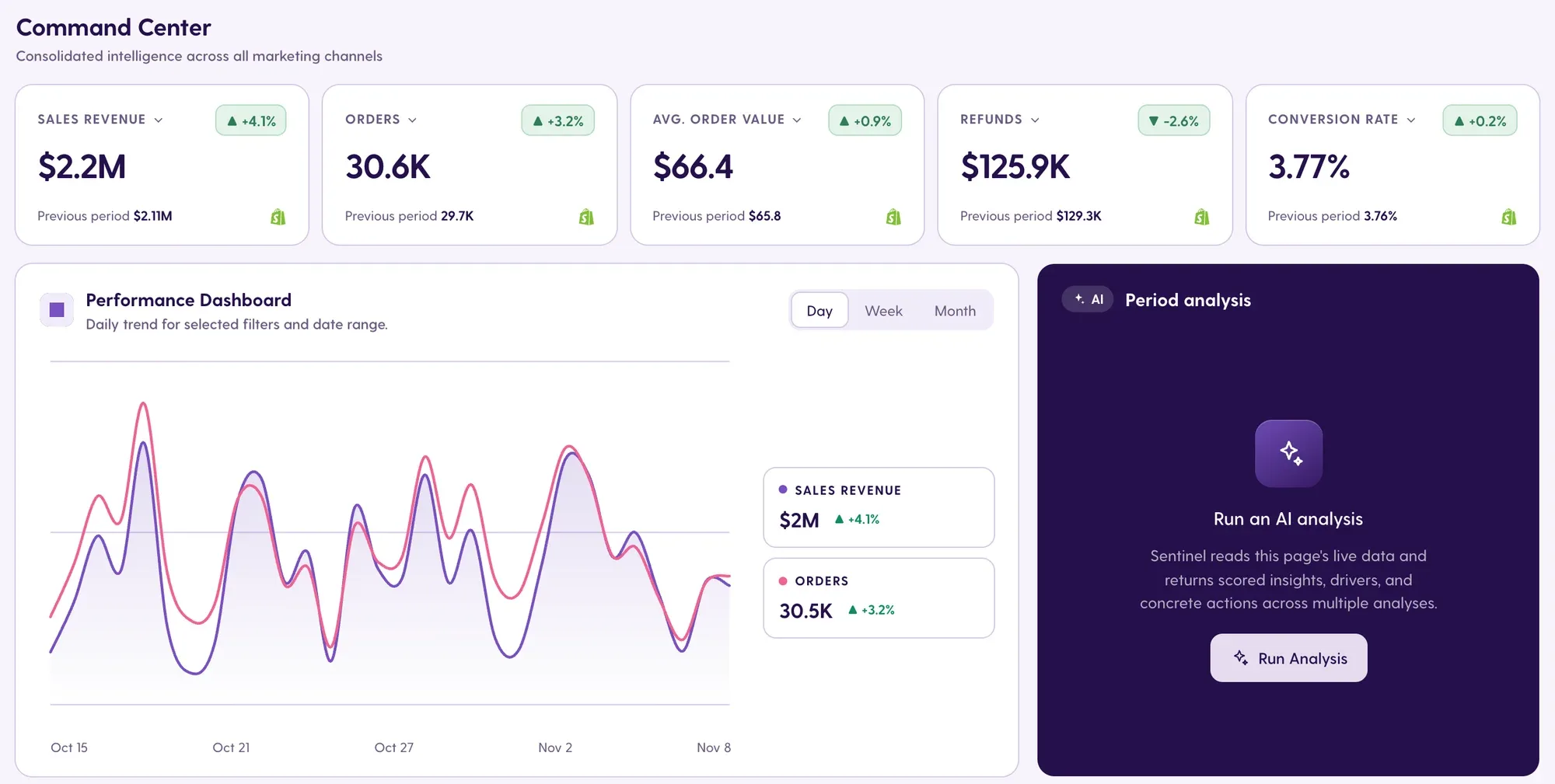
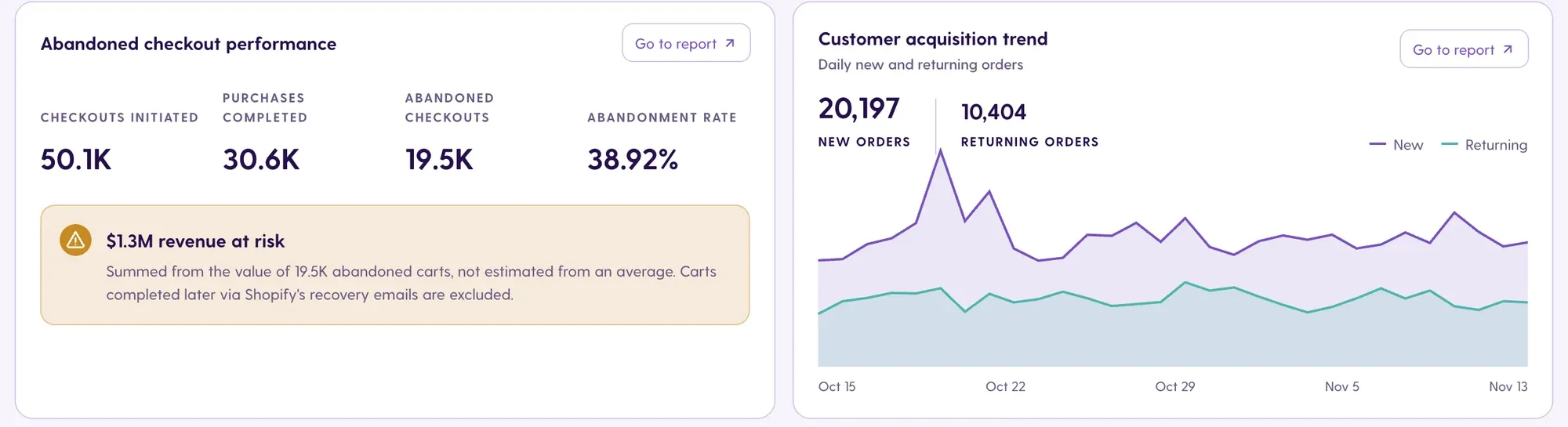
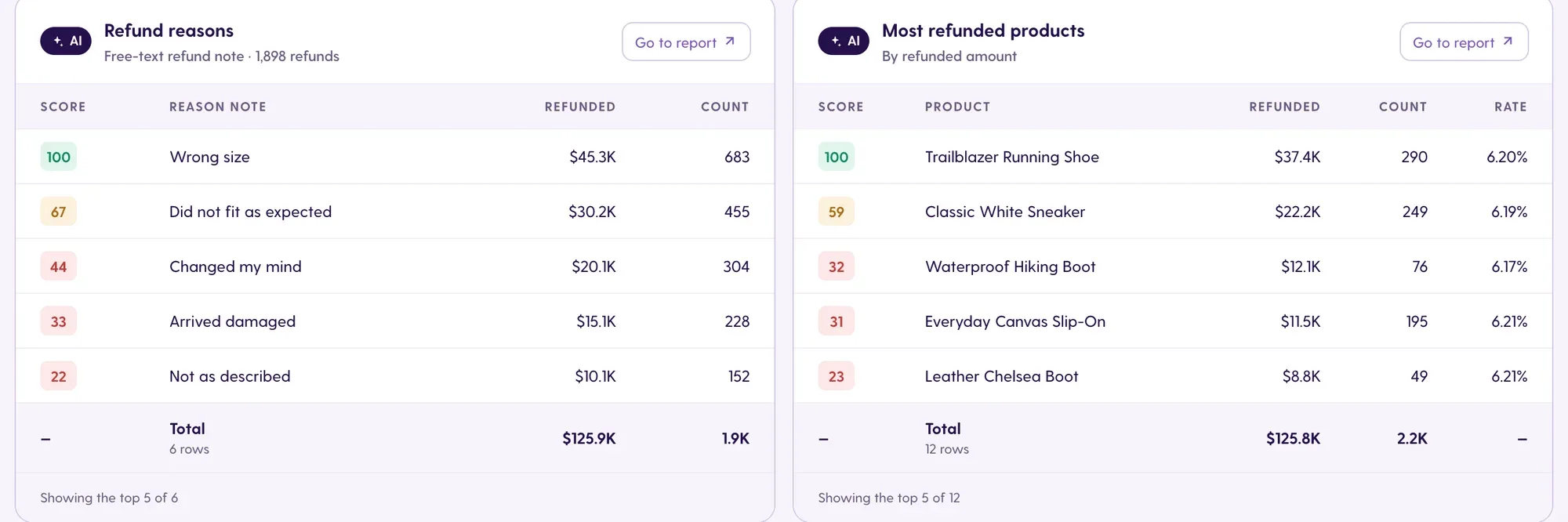
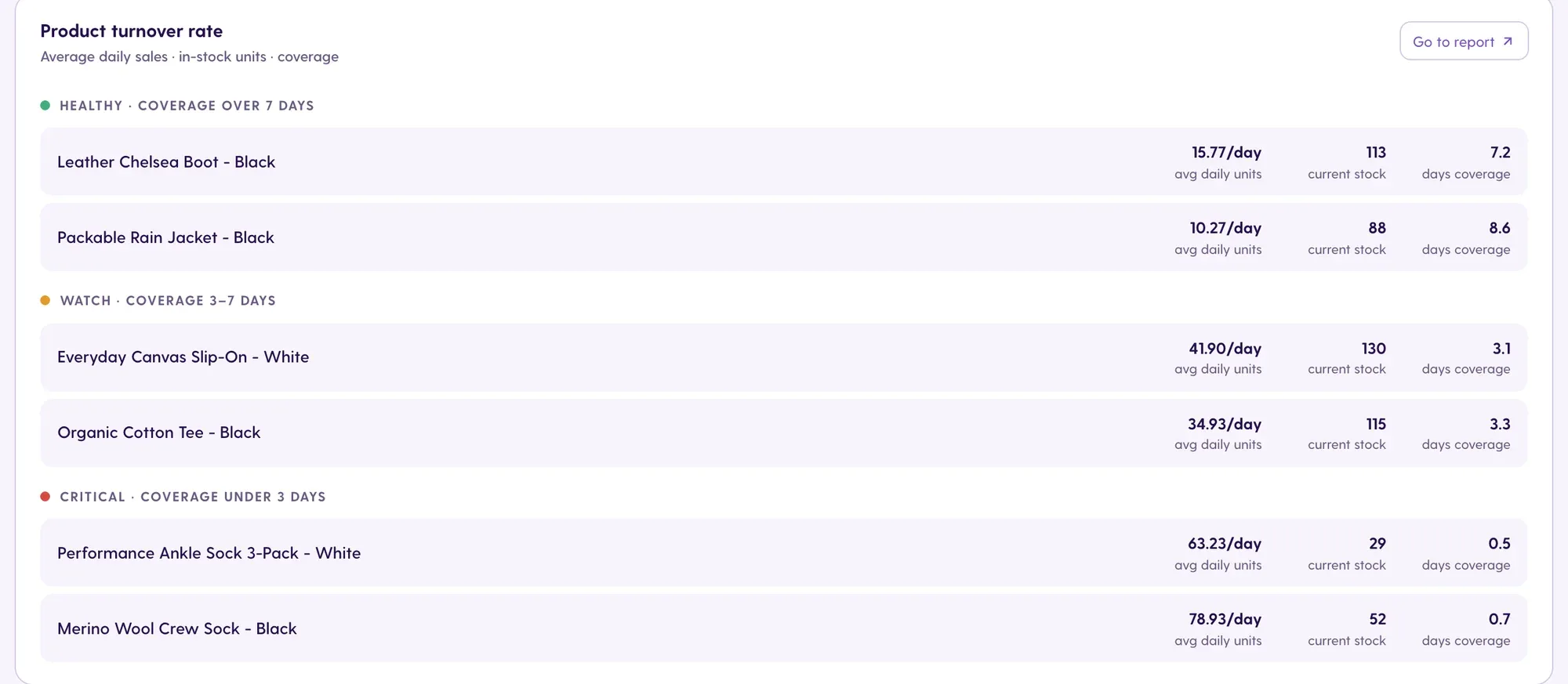
Meerkads publishes this guide and is our own product, so judge this card with that in mind. Meerkads connects Shopify with Google Ads, Meta Ads, TikTok Ads, GA4 and Google Search Console, then matches ad spend with real Shopify sales, including product revenue, refunds and cost of goods, to show true ROAS, with a blended ROAS card that shows MER alongside. The Shopify dashboard covers sales, orders, AOV, refunds, conversion rate, abandoned checkouts with revenue at risk, new vs returning orders, refund reasons and stock coverage per product. A Period analysis AI card reads the live page and returns scored insights, drivers and suggested actions, and you decide what to apply. Agencies get a portfolio view of which brands need attention, plus white-label reports and dashboards. It has no pixel or multi-touch attribution, no custom SQL, and Shopify is the only store platform live today.
- Pricing: Scout $49/month per brand, Sentinel $149/month per brand (AI analysis, alerts, report automations, white-label); yearly billing gives 2 months free. See pricing.
- Trial: 7-day free trial, cancel anytime.
- Platforms: Shopify, Google Ads, Meta Ads, TikTok Ads, GA4, Google Search Console. More store platforms are planned, not live.
- What it reports: ecommerce vs marketing performance, true and blended ROAS, refunds, abandoned checkouts, stock coverage, campaign to product level results.
- Coming soon (not available yet): add-ons for catalog image optimization, video creation from products, catalog optimization (removing broken size-set products from ad catalogs), keyword tracking and LLM (AI search) visibility tracking; the Hunter plan will add AI budget optimization and AI ad copy and image generation. Our score reflects only what is live today.
Refund reasons and most-refunded products carry AI scores, and stock coverage flags products before a stockout wastes ad spend. Build your own views in Dashboards or query your data from Claude or ChatGPT through the read-only Meerkads MCP connection.
Pros
- Shopify revenue, refunds and COGS matched against Google, Meta and TikTok spend out of the box.
- AI findings in plain language with a suggested next step, plus anomaly alerts for ROAS floors, CPA ceilings and spend limits.
- Flat per-brand pricing, portfolio view and white-label reporting for agencies; available in English, Turkish, Spanish and German.
Cons
- No tracking pixel, multi-touch attribution or MMM.
- No custom SQL; LTV analysis is lighter than Lifetimely or Peel.
- Shopify is the only live store integration; Amazon, WooCommerce and others are planned.
2. Triple Whale: best for DTC attribution with its own pixel
Score: 8.8/10 · Best for: DTC brands with meaningful ad spend that want attribution, BI and agentic AI in one platform
Triple Whale calls itself "the AI operating system for ecommerce" and says more than 60,000 brands use it. Its core is the Triple Pixel, a first-party pixel with multi-touch attribution, surrounded by BI dashboards, an SQL editor, custom metrics, cohort, product and creative analysis, benchmarks and 60+ integrations. Moby AI answers questions in chat and Slack, the Automate plan adds Moby Actions that can adjust budgets, pause or launch ads within guardrails, and Enterprise adds Compass for multi-touch attribution, marketing mix modeling and incrementality. Triple Whale is not currently on the Shopify App Store; it connects to your store directly, so there is no App Store rating. It is the deepest option here, but pricing is not public and contracts run 12 months.
- Pricing: No public pricing. Plans are Free, Foundation, Automate and Enterprise, priced on annual GMV and package.
- Trial: Free plan available.
- Platforms: Shopify, WooCommerce, BigCommerce.
- What it reports: pixel-based attribution, cohorts, product and creative performance, custom metrics via SQL.
Pros
- First-party pixel and multi-touch attribution, with MMM and incrementality on Enterprise.
- Agentic AI that can act on budgets within guardrails.
- SQL editor and custom metrics for analysts.
Cons
- No public prices; GMV-based with 12-month subscriptions.
- Heavier setup because the pixel has to be installed and trusted.
- No current Shopify App Store listing to check reviews.
3. Polar Analytics: best for warehouse-grade BI
Score: 8.5/10 · Best for: larger brands and agencies that want a data warehouse, attribution and AI agents
Polar's App Store listing ("Polar:AI Platform for commerce") is rated 4.9 from 116 reviews. It reports profit, contribution margin, LTV and cohorts by channel and product, plus ROAS, MER and blended CAC across Meta, Google, TikTok and Amazon, with inventory and stockout tracking. The Core Plan bundles BI, AI agents and data activations, and adds multi-touch attribution with the Polar Pixel, custom reports, alerts and scheduled reports, a dedicated Snowflake database and unlimited users and history. Its AI Operator works in Slack or Teams, answers questions and, after your approval, shifts budgets or pauses ads. The trade-off is a high, GMV-based entry price.
- Pricing: Core Plan from $750/month based on online GMV, with annual discounts; Custom Plan by demo. See Polar's pricing page.
- Trial: No free plan.
- Platforms: Shopify; ad data from Meta, Google, TikTok and Amazon.
- What it reports: profit, contribution margin, LTV, cohorts, blended CAC, MER, inventory.
Pros
- Warehouse-grade data with a dedicated Snowflake database.
- Pixel-based attribution plus incrementality testing as an add-on.
- Unlimited users and history, which suits agencies.
Cons
- High entry price for smaller stores.
- GMV-based pricing grows with revenue.
4. Lifetimely: best for profit and LTV on a budget
Score: 8.3/10 · Best for: Shopify stores that want P&L, LTV and cohorts without a big bill
Lifetimely Profit Analytics, made by AMP, is rated 4.9 from 628 reviews on the App Store. Its free plan is unusually generous: daily P&L, customer behavior analytics, custom reports and dashboards, predictive LTV, benchmarks, product insights and a sales forecast. AMP's product page adds LTV and CAC, cohorts and customer journeys, attribution showing each channel's contribution to profit, and scheduled reports to Slack or email. Paid plans add the Profit Agent, which monitors changes, explains the cause, recommends a fix and acts only after your approval, plus unlimited users and integrations and a Lifetimely MCP for ChatGPT and Claude. AMP says 45,000+ stores use it. The highest listed tier covers 7,000 orders a month.
- Pricing: Free; $49/month up to 500 orders, $149 up to 3,000, $299 up to 7,000. Amazon add-on $75/month.
- Trial: 14-day trial on paid plans.
- Platforms: Shopify, Amazon (add-on).
- What it reports: daily P&L, predictive LTV, CAC, cohorts, channel profit contribution.
Pros
- Free plan covers P&L, LTV and custom dashboards.
- Strong cohort and customer journey analysis.
- Profit Agent explains changes and waits for approval before acting.
Cons
- Shopify-centric, with Amazon as a paid add-on.
- Pricing above 7,000 orders a month is not published on the listing.
- Less focused on campaign-level ad analysis than ad-first tools.
5. TrueProfit: best for affordable real-time net profit
Score: 8.1/10 · Best for: growing stores that want net profit by product and ad without setup work
TP: True Profit Analytics by FIREAPPS is rated 4.9 from 930 reviews. It calculates real-time net profit by pulling COGS, shipping, fees, taxes and custom costs automatically, and syncs ad spend from Facebook, Google, TikTok, Bing, Snapchat and Amazon to show product- and ad-level profit. LTV is included, P&L and email reports start on Advanced, and marketing attribution is reserved for Enterprise. There is a mobile app and an all-store view, plus a TrueProfit MCP for ChatGPT and Claude. The catch is billing: each plan includes a set number of orders and charges per extra order up to a monthly cap, so your real cost depends on volume.
- Pricing: Basic $35 (300 orders), Advanced $60 (600), Ultimate $100 (1,500), Enterprise $200 (3,500), each with per-order surcharges and caps.
- Trial: 14-day trial; no free plan.
- Platforms: Shopify; ad spend from six ad platforms; mobile app.
- What it reports: net profit, product- and ad-level profit, LTV, P&L.
Pros
- Affordable entry with automatic cost tracking.
- Syncs ad spend from six ad platforms, including Bing and Snapchat.
Cons
- Usage surcharges make costs less predictable.
- Attribution only on the Enterprise tier.
- AI limited to an MCP connection.
6. BeProfit: best for order-level profit across channels
Score: 7.7/10 · Best for: merchants selling on Shopify plus Amazon or WooCommerce who want contribution profit per order
BeProfit Profit Analytics is rated 4.5 from 202 reviews, the lowest rating in this group but still solid. It positions itself as "the profit platform for multi-channel commerce" and supports Shopify, Amazon and WooCommerce. Reports cover contribution profit per order and product, POAS next to ROAS, net shipping (what you charged versus what the carrier billed), expense tracking and a daily profit email, with unlimited ad integrations. Custom reports, dashboards and P&L start on Pro; UTM tracking, LTV cohorts and simulators are Scale features. AI comes as monthly credits for asking Claude or ChatGPT through MCP, with AI insights on Scale. A free plan covers 150 orders and 6 months of history.
- Pricing: Free; Basic $29/month, Pro $99, Scale $149; extra orders $0.30 each up to $500/month; annual plans include unlimited orders.
- Trial: 14-day trial.
- Platforms: Shopify, Amazon, WooCommerce.
- What it reports: contribution profit, POAS vs ROAS, net shipping, expenses.
Pros
- POAS and net shipping views most tools skip.
- Multi-channel store support.
Cons
- Cohorts and UTM tracking only on the Scale plan.
- Attribution is not claimed.
7. Peel Insights: best for retention and subscription analytics
Score: 7.1/10 · Best for: repeat-purchase and subscription brands that live in cohorts
Peel: Retention Analytics is rated 5.0 from 38 reviews. It specializes in cohorts, RFM, LTV, CAC, subscription analytics, market basket and audience overlap analysis, with ad data from Google, Facebook and Amazon, exports to Google Sheets and Klaviyo, and daily digests. Peel says all plans get full features, with custom report credits rising by tier (none on Core, one on Essentials, two on Accelerate). Magic Dash is its AI feature, though the pages we checked name it without describing it. It is a retention lens rather than a daily ad and profit dashboard.
- Pricing: Core $199/month (up to 6k orders, 3 stores), Essentials $499, Accelerate $899; yearly 10% off; Tailored for 62,000+ orders. See Peel's pricing page.
- Trial: 7-day trial; no free plan.
- Platforms: Shopify, Amazon.
- What it reports: cohorts, RFM, LTV, subscriptions, market basket.
Pros
- Deepest retention and subscription analysis in this list.
- Multi-store support from the first plan.
Cons
- Starts at $199/month.
- Limited attribution and ad analysis.
8. Shopify Analytics + Sidekick: best free native option
Score: 6.8/10 · Best for: every store as the baseline, and small stores before they add an app
Shopify's built-in analytics comes with every plan: a customizable dashboard of metric cards, 200+ real-time reports, Live View, saved custom reports and spreadsheet export. Sidekick builds custom reports from plain-language requests and can run its own code to forecast, compare or summarize store data. There is nothing to install and the data comes straight from the source. The limits appear once you run ads: the pages we checked do not claim ad-spend-based profit, LTV cohorts or attribution, so most stores pair native analytics with one of the apps above.
- Pricing: Included in Shopify plans: Basic $27/month ($19 yearly), Grow $72, Advanced $399, Plus from $2,300. See Shopify pricing.
- Trial: Included with any plan.
- Platforms: Shopify admin.
- What it reports: sales, orders, customers, products, real-time activity.
Pros
- Free, real-time and native.
- Sidekick builds reports and analysis on request.
Cons
- No cross-platform ad spend or blended ROAS claimed.
- No LTV cohorts or attribution claimed.
9. Report Pundit: best for cheap custom and scheduled reports
Score: 6.6/10 · Best for: stores that need custom Shopify reports delivered on a schedule for very little money
Report Pundit: Custom Reports by Estore Automate is rated 5.0 from 2,074 reviews, the largest review base in this comparison. It offers about 150 prebuilt reports, calculated fields and access to metafields, tags and line items, with exports and schedules to Excel, CSV, PDF, Slack and Google Sheets. The vendor lists 30+ integrations including payments, shipping and ads, with app integrations and multi-store support on the Advanced plan. AI comes through an MCP connection for Claude and ChatGPT. It is hard to beat on price, but it is a reporting tool, not a profit platform.
- Pricing: Free under 1,000 lifetime orders; Basic $9/month, Grow $19, Advanced $35, tied to your Shopify plan.
- Trial: 14-day trial.
- Platforms: Shopify, including multi-store and Markets on Advanced.
- What it reports: custom sales, order, product and customer reports.
Pros
- Lowest paid price in this list.
- Scheduling to Slack, Sheets, PDF and more.
Cons
- No profit or attribution modeling.
- Supported ad platforms are not named.
10. Better Reports: best for flexible custom reporting
Score: 5.9/10 · Best for: operations and finance teams that need exact custom reports, built for them if needed
BR: Better Reports is rated 5.0 from 1,201 reviews. It lets you build custom reports, fields and metrics with charts, schedule them by email or to Google Sheets and export to PDF, Excel or CSV, and it includes a free service where the team builds custom reports for you. It handles tags, metafields and attributes, POS, multi-store and multi-currency, and the vendor lists 100+ built-in reports, BRQL for custom metrics, 500+ connectors and per-team permissions. COGS, profit and LTV report categories are listed without much detail, and no AI features are listed.
- Pricing: Basic $19.90/month, Grow $39.90, Advanced $149.90, Plus $299.90, tied to your Shopify plan.
- Trial: 14-day trial; no free plan.
- Platforms: Shopify, including POS and multi-store.
- What it reports: custom reports on orders, products, customers, inventory and finance.
Pros
- Very flexible custom metrics with BRQL.
- Done-for-you report building included.
Cons
- Not a profit, attribution or ad-performance tool.
- No AI features listed.
How to choose the right Shopify analytics tool for you
Start with your bottleneck, not the feature list:
- "I don't know which ads actually drive profit." You need ad spend and store revenue together. Meerkads gives you true and blended ROAS from platform and store data without a pixel; Triple Whale or Polar add pixel-based attribution if you need it. Our explainer on true ROAS vs blended ROAS shows the formulas.
- "Ads Manager and Shopify never match." That is normal; see why your Meta Ads dashboard and Shopify revenue never match, then pick a tool that reports both side by side.
- "I don't know my real margin." Lifetimely, TrueProfit or BeProfit track COGS, shipping and fees per order.
- "Customers don't come back." Peel or Lifetimely for cohorts and LTV.
- "I spend hours building reports." Report Pundit or Better Reports for scheduled custom reports, or Meerkads for ready-made, white-label ones.
- "I manage many brands or clients." Meerkads for a portfolio needs-attention view and agency reporting; Polar if you want unlimited users on a warehouse. If you are weighing Triple Whale specifically, see our Triple Whale alternatives.
| Monthly budget | Good fits | What you get |
|---|---|---|
| $0 | Shopify Analytics + Sidekick, Lifetimely Free, BeProfit Free, Report Pundit Free | Native reports, AI-built reports, basic P&L and LTV |
| Under $50 | Meerkads Scout, Lifetimely, TrueProfit, BeProfit Basic, Report Pundit, Better Reports Basic | Store + ad dashboards, profit tracking or scheduled custom reports |
| $50 to $200 | Meerkads Sentinel, Lifetimely, TrueProfit Ultimate, BeProfit Pro or Scale, Peel Core | AI analysis and alerts, deeper profit, cohorts |
| $200+ | Polar Analytics, Peel Essentials, Triple Whale (custom quote) | Pixel attribution, warehouse BI, agentic AI |
What to check before you trust a tool with your store data
- Cost inputs: confirm how COGS, shipping, fees and refunds enter the tool; profit is only as good as these.
- Reconciliation: compare last month's revenue and orders with Shopify's own reports. Large gaps need an explanation.
- Attribution method: know whether ROAS comes from platform-reported conversions, a pixel model or store revenue divided by spend, and do not mix them in one decision.
- Pricing at your scale: model the price at next year's order volume or GMV, including surcharges and annual commitments.
- AI permissions: check whether the AI only reads data or can change budgets and pause ads, and what approval it needs first. MCP connections should be read-only unless you choose otherwise.
- Alerts: make sure you can set thresholds for ROAS drops, CPA spikes and broken connections, so problems reach you before the weekly report does. See how monitoring and alerts work in Meerkads.
FAQ
What is the best Shopify analytics dashboard in 2026?
In our comparison, Meerkads ranks first overall for stores and agencies that want Shopify revenue, refunds and Google, Meta and TikTok spend in one view with AI recommendations at a flat per-brand price (Meerkads publishes this guide). Triple Whale is the pick for pixel-based DTC attribution, and Lifetimely or TrueProfit are the best value for profit and LTV.
Is Shopify's built-in analytics enough?
For small stores without much ad spend, often yes: every plan includes 200+ real-time reports, custom reports and the Sidekick AI assistant. Once you spend on several ad platforms, you will want a tool that combines ad spend with store revenue and costs to show real profit and blended ROAS.
What is the difference between Shopify reporting apps and Shopify analytics apps?
A Shopify reporting app such as Report Pundit or Better Reports builds, schedules and exports custom reports from your store data. Shopify analytics apps such as Triple Whale, Polar, Lifetimely or Meerkads go further by adding ad spend, profit, LTV or AI analysis to explain performance and suggest what to do next.
Which Shopify AI tools can analyze my store data?
Sidekick is built into Shopify and can generate reports and forecasts. Among apps, Triple Whale's Moby, Polar's AI Operator, Lifetimely's Profit Agent and Meerkads' AI recommendations analyze data proactively, and most tools here, including Meerkads, Lifetimely, TrueProfit, BeProfit and Report Pundit, offer MCP connections so you can ask Claude or ChatGPT about your data.
Do I need a tracking pixel for accurate Shopify analytics?
Not for every decision. Store revenue divided by total ad spend (blended ROAS or MER) needs no pixel and is hard to inflate, which is the approach Meerkads takes. A first-party pixel, as in Triple Whale or Polar, adds channel- and ad-level attribution, which matters most for larger DTC brands splitting budget across many campaigns.
Hakan Sancak · CEO & Co-founderHakan Sancak is the CEO and co-founder of Meerkads. Writes about AI advertising, performance marketing and marketing analytics.