PPC
Meta Ads MCP, Google Ads MCP, GA4 MCP: Which One Do You Need?
Every ad platform now has an MCP server. Here is what each one can do, where it stops, and how to get all your numbers into Claude or ChatGPT.
 Edip Ali Avcıbaşı · 13 min read
Summarize with AI
Contents 9 sections
- What is MCP, and what is an MCP server?
- Which ads MCP servers exist?
- Do you need five MCP servers, or one?
- What can you ask Claude or ChatGPT about your ads?
- Can AI change my ad campaigns through MCP?
- Can AI tools get my Facebook ad account banned?
- Is it safe to connect ad accounts to an AI assistant?
- How do I connect Meerkads MCP to Claude or ChatGPT?
- Frequently asked questions
In May 2026, almost nobody searched for "facebook ads mcp". According to SE Ranking, US searches for it more than tripled between June and October. Searches for "meta ads mcp" nearly tripled from May to August, and "google search console mcp" more than doubled over the same months.
Marketers have noticed what developers already knew. An AI assistant is far more useful once it can read your real numbers.
MCP is spreading outside advertising too. In October 2026, Figma announced 20 new MCP partners. Financial Cents, a practice management tool for accounting firms, launched its own MCP server the same month.
Meta, TikTok and Google now offer MCP servers, and Shopify has several. Marketers keep asking the same questions. What is MCP? Which ads MCP servers exist, and how do you connect them? Can AI get your Facebook ad account banned? Do you need one server per platform, or one connection?
The short answer, as of October 2026:
- Meta Ads MCP: official and hosted by Meta at mcp.facebook.com/ads. It can read and edit campaigns.
- TikTok Ads MCP: official TikTok for Business MCP Server. It can read and edit campaigns.
- Google Ads MCP and GA4 MCP: official open-source servers from Google that you install and run yourself. Read-only by default.
- Google Search Console MCP: no official server, only community projects you run yourself.
- Shopify MCP: built for developers and shopping agents. It doesn't report on ads.
- AI browser agents that log in to Ads Manager for you: Meta's terms forbid automated access without permission. This is the riskiest route for your account.
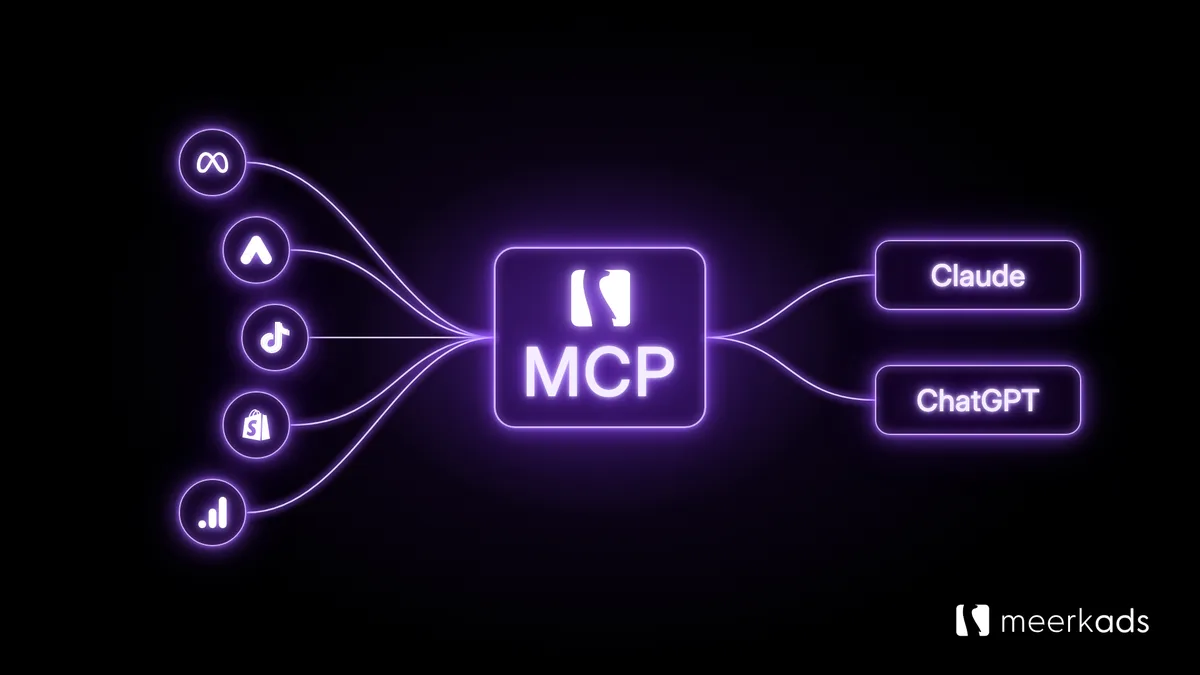
- Meerkads MCP: one read-only connection to all six, with ad spend and store revenue in the same data set.
What is MCP, and what is an MCP server?
MCP (Model Context Protocol) is an open standard that lets AI assistants like Claude and ChatGPT read data from other software. Anthropic released it in November 2024, and both Claude and ChatGPT now support it.
An MCP server connects the assistant to one piece of software. It tells the assistant which questions it can answer, then fetches the numbers when you ask. In Claude, an MCP server you add is called a connector; in ChatGPT, it is called an app.
Think of it as a USB-C port for AI. Without it, you export a CSV, paste it into a chat and hope the model reads the columns correctly. With it, you ask "How was my ROAS in September?" and the assistant pulls the answer from the source.
Which ads MCP servers exist?
As of October 2026, Meta, Google and TikTok have official ads MCP servers. Search Console has no official server, and Shopify's servers don't report on ads.
Is there an official Meta Ads MCP (Facebook Ads MCP)?
Yes. Meta's Ads MCP server, part of its ads AI connectors, opened as a beta on April 29, 2026. Meta hosts it at https://mcp.facebook.com/ads, and it officially supports ChatGPT, Claude, Claude Code and Perplexity. You don't need a developer app or API token.
It covers reporting, ad creation and management, custom audiences, catalogs, signal diagnostics, A/B tests and lift studies, and activity logs. So the assistant can create and edit campaigns, ad sets and ads. Every action needs your approval in the chat. New ads stay paused until you set them live.
It can't see anything outside Meta. It doesn't know what Shopify actually recorded, so it reports Meta's attributed revenue. If those two numbers rarely agree for you, read why your Meta Ads dashboard and Shopify revenue never match.
How do I connect the Meta Ads MCP to Claude or ChatGPT?
- Copy Meta's server URL: https://mcp.facebook.com/ads.
- In Claude, open Connectors, choose Add custom connector and paste the URL. In ChatGPT, add it as a custom app in Settings. On some plans, you need to turn on developer mode first.
- Sign in with your Meta account and allow access.
- Recommended: in Meta Business Suite, go to Settings → Integrations → Ads MCP server. Block the actions you don't want an agent to take, such as creating campaigns or setting budgets above a limit.
Meta's help article on ads AI connectors links to the setup steps for each supported assistant.
Is there a Google Ads MCP server?
Yes. Google publishes an open-source Google Ads MCP server on GitHub. It is built for technical teams: you run it yourself, on your own computer or cloud. Setup needs a Google Ads developer token, a Google Cloud project with the Google Ads API enabled, and OAuth credentials.
Its tools read data. The main one runs Google Ads Query Language (GAQL) searches, and the assistant writes the query for you. There is no tool for changing campaigns.
Without a developer, setup is the hard part. A hosted Google Ads connector such as Meerkads MCP gives your assistant the data without a developer token or a Cloud project. If Performance Max is your main campaign type, read why PMax product-level performance is invisible before you trust any single number.
Is there a GA4 MCP (Google Analytics MCP server)?
Yes. Google's Google Analytics MCP server is also open source and runs on your own computer. It is labeled experimental and only reads by default. Its one write action, adding annotations, stays off until you turn it on.
Setup needs Python, a Google Cloud project with the Analytics Admin and Data APIs enabled, and Google credentials.
GA4 tells you about sessions, users and conversions. It doesn't hold your ad spend. So GA4 alone can't answer "what did each channel return for what we spent?" For that, see how to connect ad spend to actual store revenue.
Is there a Google Search Console MCP?
Not an official one. Google publishes MCP servers for Google Ads and Analytics, but as of October 2026 there is none for Search Console.
Community-built GSC MCP servers on GitHub cover search analytics and URL inspection. As with Google's own servers, you install them yourself and set up Google Cloud credentials.
Meerkads MCP includes Search Console in the same connection as your ad accounts. The assistant can report organic clicks, impressions, click-through rate and average position for any period, next to your paid search numbers.
Is there a Shopify MCP?
Shopify has several, but none of them is a marketing report. The Shopify Dev MCP server helps developers search Shopify's docs and API schemas. Its agent MCP servers (Catalog, Cart, Checkout and Order) let shopping assistants browse products and buy on a shopper's behalf.
So a Shopify MCP can help you build a store or sell through AI. It won't tell you which ad campaign drove last week's orders. That question needs Shopify revenue and ad spend in the same place. To use Claude with Shopify for questions like this, you need a server that holds both, such as Meerkads MCP.
Is there a TikTok Ads MCP?
Yes. TikTok launched the TikTok for Business MCP Server at TikTok World in May 2026. Like Meta's, it can manage campaigns as well as report on them. It also covers audiences and creative operations. Several community-built TikTok Ads MCP servers on GitHub offer read-only reporting instead.
Short-video creatives wear out fast, so creative fatigue is often the first thing to ask about on TikTok. We explain how to detect creative fatigue before it erodes your ROAS in a separate post.
What about third-party ads MCP servers?
Several marketing tools now offer hosted MCP servers that cover more than one ad platform. Some of them can also create or edit campaigns. Before you connect one, check:
- Which platforms it covers, and whether that includes your store and analytics data.
- Whether it connects through the platforms' official APIs or drives the ad manager with your login.
- Whether it can change campaigns, budgets or bids, and who approves those changes.
- What it sends to the assistant, and whether it keeps a copy.
Do Claude and ChatGPT need different MCP servers?
No. MCP is one standard, so the same remote server works in both. Using Claude with Meta Ads or Google Ads works the same way as using ChatGPT.
In Claude, you add it as a custom connector. Free accounts can add one; paid plans can add more. In ChatGPT, you add it as a custom app in Settings, which may require developer mode.
Claude and ChatGPT both give a confident answer from whatever the connectors return. If that data is incomplete or wrong, the answer is too.
Do you need five MCP servers, or one?
A single-platform MCP answers single-platform questions well: Meta's server knows Meta, and Google's knows Google Ads. But the questions that move budgets rarely stop at one platform:
- Is Meta or Google driving the revenue Shopify actually recorded?
- What was our blended ROAS last month, across every channel?
- If I move 20% of budget from the weakest campaigns to the strongest, what happens?
With five separate connections, the assistant has to combine five data sets inside one chat. Each has its own currency, attribution window and naming, and this is where answers go wrong. It is the same problem as attribution anomalies; this time, the AI does the combining.
Meerkads MCP takes the other route: one read-only connection to Google Ads, Meta Ads, TikTok Ads, Shopify, GA4 and Google Search Console, combined into one data set. If your accounts use different currencies, Meerkads converts totals to US dollars.
Ad spend and store revenue sit side by side, so the assistant doesn't have to combine them. The same address works in Claude and ChatGPT.
What can you ask Claude or ChatGPT about your ads?
Once connected, ask in your own words. These work today with Meerkads MCP:
- "How did my campaigns do this week?"
- "What are my five highest-spending campaigns?"
- "Which search terms cost money without converting? Suggest negatives."
- "Do I have any creative fatigue on Meta or TikTok?"
- "What changed compared to last month?"
- "If I move 20% of budget away from my lowest-ROAS campaigns, what happens to blended ROAS?"
An answer looks like this, from our demo store:
Spend is up 8% and blended ROAS held at 4.5x. Three campaigns stand out: Performance Max - Main Catalog at 6.0x ROAS (+12%), Reels - Trending Products at 4.6x (-9%) and TikTok Spark - Brand Awareness at 4.4x (-14%). TikTok Spark lost 14% ROAS while its spend grew, so shifting budget toward Performance Max is worth a look.
To answer these questions, the assistant can use up to 26 read-only tools. The number depends on your plan and settings. It picks the right tool for each question:
- Performance and comparison: top campaigns, period-over-period changes and "what changed" summaries.
- Search waste: Google Ads search terms that spent without converting, with negative keyword suggestions.
- Creative fatigue: ads on Meta, TikTok and Google whose CTR or CPA is well off the account average. It also finds ads with high spend but weak conversion.
- Anomalies: flags unusually strong or weak performance automatically.
- Budget simulation: what happens to blended ROAS if you move a share of budget from the weakest campaigns to the strongest.
- Forecasts: where spend or revenue will land if the current trend holds.
If you're not sure which numbers to watch first, start with the KPIs that actually predict results.
Can AI change my ad campaigns through MCP?
It depends on the server. Meta's and TikTok's official servers can create and edit campaigns. On Meta, you can block specific actions in Business Suite. Google's Google Ads and GA4 servers are built for reading. Meerkads MCP is read-only by design: the assistant can't change campaigns, budgets or bids.
The two approaches work well together. Use Meerkads to find what to change across channels. Check it, then make the change in the platform or through the platform's own connector.
Can AI tools get my Facebook ad account banned?
They can, depending on how they reach your account. Meta's Terms of Service say you may not access or collect data from its products "using automated means" without prior permission. AI browser agents that log in to Ads Manager as you and click through it are doing exactly that.
The risk depends on the route:
- Browser agents and scripts that use your login: the riskiest route. They work through the ad manager screen as if they were you, which is the automated access Meta's terms rule out.
- Official connectors and APIs: the route Meta built for this. Meta says using its ads MCP server on its own doesn't put your account at risk. Changes still have to follow its advertising policies, so review what an agent proposes before you approve it.
- A read-only layer such as Meerkads MCP: the assistant never logs in to your ad accounts or sees your platform access tokens. It sends its question to Meerkads. Meerkads reads the numbers through the platforms' official APIs, using the connection you approved during setup.
That puts Meerkads between the assistant and your ad accounts. The tools are read-only, so the assistant can't change a campaign or a budget. Meerkads rate-limits requests per workspace. It answers repeat questions from a short-lived cache instead of calling the platform again.
No tool can promise that an account will never be restricted. This route keeps the AI out of the ad manager and away from your settings.
Is it safe to connect ad accounts to an AI assistant?
It can be, as long as you know what the connection can reach. Before you add any MCP server, check what it can change, what it sends to the assistant and whether it keeps a copy. Meerkads MCP answers those questions like this:
- Read-only: the assistant cannot change campaigns, budgets or bids.
- No platform logins or tokens: the assistant gets a short-lived Meerkads token, never your Meta, Google or TikTok credentials.
- One workspace per connection: one client's data never mixes with another's.
- Profit data off by default: five tools use profit, margin and cross-channel spend totals. They work only if you switch them on, when you connect or later in Settings.
- No customer records: tools return campaign and store totals. Customer names, email addresses and order details aren't part of them.
- No conversation logs: your chat stays in Claude or ChatGPT. Meerkads receives only which tool to run and its inputs, such as the date range. It doesn't store questions or answers. It reads figures from the platforms when asked and caches them for a short time.
- OAuth sign-in: you never paste an API key into a chat. You can disconnect at any time in Settings → AI assistants. Access stops on the next request.
For agencies, the bigger question is whether AI answers are good enough to show clients. We cover that in what AI can (and can't) do for agency reporting.
How do I connect Meerkads MCP to Claude or ChatGPT?
- In Meerkads, open Settings → AI assistants.
- Copy your server address. The same address works for Claude and ChatGPT.
- Add it to your assistant. In Claude: Connectors → Add custom connector. In ChatGPT: Settings → Apps (Connectors in older versions), then add a custom one.
- Paste the address and connect.
- Sign in to Meerkads, choose a workspace and select Allow access.
The connection is included in your Meerkads plan. Your Claude or ChatGPT subscription covers the chat itself. The full walkthrough is on the Meerkads MCP page.
Frequently asked questions
Is MCP free?
The protocol is free and open. Meta's, TikTok's and Google's servers cost nothing extra, though you still need an ads account and an assistant plan that supports custom connectors. Meerkads MCP is included in your Meerkads plan, and new users can start with a 7-day free trial.
Do I need to write code to use an ads MCP?
Not for hosted servers. Meta's, TikTok's and Meerkads' connectors only need an address and a sign-in. Google's Google Ads and GA4 servers are different: you install and run them yourself.
MCP vs API: what is the difference?
An API is how a platform lets other software read and change its data. An MCP server sits on top of an API and describes it in a way an AI assistant understands. The assistant can then decide which data to fetch for your question, without anyone writing code.
Connector, app or MCP server: what's the difference?
They are three names for the same thing. An MCP server is the service that gives an AI assistant access to a piece of software. Claude lists the servers you add as connectors, and ChatGPT lists them under Apps. Adding Meerkads MCP as a Claude connector or as a ChatGPT app connects you to the same server.
Can I use Claude for Meta Ads and Google Ads?
Yes. Add Meta's Ads MCP for Meta alone, or Meerkads MCP for Meta, Google Ads, TikTok, Shopify, GA4 and Search Console together. Then ask Claude about your campaigns in plain English.
Can an ads MCP get my ad account banned?
Meta says that using its ads MCP server on its own doesn't put your account at risk. Restrictions come from breaking its policies, and its terms forbid automated access without permission.
AI browser agents that log in to Ads Manager for you are the riskiest route. Meerkads MCP never logs in to your ad accounts and makes no changes. It reads through the platforms' official APIs, with rate limits.
Can I use Meta's Ads MCP and Meerkads MCP together?
Yes. Use Meta's connector to make changes inside Meta, and Meerkads to see how Meta compares with Google, TikTok and your Shopify revenue. Both can sit in the same assistant.
Does Meerkads MCP work with ChatGPT?
Yes. One server address works in both Claude and ChatGPT.
Connect your assistant in under a minute, or start a 7-day free trial if you're new to Meerkads.
Edip Ali Avcıbaşı · Co-founder & CAOCo-founder and CAO of Meerkads and Byte Digital. Has run agency operations since 2020, with a background in digital marketing, SEO and marketplaces.