
Looker Studio vs Meerkads
The Looker Studio Alternative Built for Marketing Teams
Looker Studio, now renamed Data Studio, is a great free report builder. Meerkads is for teams who want ready-made cross-channel reporting, store revenue next to ad spend, and AI that flags what changed.
Why marketers outgrow Looker Studio
Looker Studio (now Data Studio) is a powerful free report builder. The friction starts when you need daily marketing answers rather than a blank canvas.
First, a naming note. Google has renamed Looker Studio back to its original name, Data Studio, and the paid tier is now called Data Studio Pro. It is the same product most marketers still search for as Looker Studio, so this page uses both names.
Looker Studio is excellent at what it was designed for: flexible, drag-and-drop reporting on top of almost any data source, at no cost for creators and viewers. Plenty of teams start there and stay for years. The problems tend to show up as your channel mix and client list grow:
None of this makes Looker Studio a bad tool. It means you are using a general BI tool for a job that a purpose-built marketing platform can do with less setup. If you have ever added up the hours spent stitching reports together, our piece on the hidden cost of manual reporting is worth a read.
Quick verdict: Looker Studio vs Meerkads
Choose Looker Studio for free, fully custom BI. Choose Meerkads if you want ready-made marketing reporting with AI analysis and alerts on top.
Stay with Looker Studio (Data Studio) if your data lives mostly in Google products, you have someone who enjoys building reports, and you need custom visualizations or embedding that no packaged tool offers. It is free and extremely flexible.
Choose Meerkads if you run ads on Google, Meta and TikTok, sell through Shopify, and want one place that connects spend to real store revenue, explains what changed and tells you when something breaks, without building or maintaining reports. Here is how the two compare on verified facts:
| Feature | Looker Studio (Data Studio) | Meerkads |
|---|---|---|
| Starting price | Free; Data Studio Pro $9 per user per project per month | From $49 per brand per month (Scout) |
| Setup | Build every report yourself with drag and drop | Ready-made reports and dashboard templates |
| Google Ads and GA4 | Free Google connectors | Native integrations |
| Meta, TikTok, Shopify | Usually via third-party connectors, which may cost extra | Native integrations, no extra connector fees |
| Data source breadth | 1,400+ data sources and community connectors | 6 live integrations, more planned |
| Ad spend vs store revenue | Possible with blending and calculated fields you build | Blended ROAS and MER against Shopify revenue out of the box |
| AI analysis | Gemini features with Pro | Plain-language findings with a suggested next step for each |
| Anomaly detection | Not offered; chart alerts with Pro | 24/7 monitoring, thresholds and pattern-based anomaly alerts |
| White-label client sharing | No white-label portal | White-label reports and read-only dashboard links |
| Custom BI flexibility | Very high | Focused on marketing and ecommerce performance |
Ready-made reports instead of building from scratch
The biggest day-to-day difference: in Meerkads, the reports already exist when you connect your accounts.
In Looker Studio, a useful marketing report starts with choosing connectors, blending sources, writing calculated fields and laying out charts. Templates from the community gallery help, but you still adapt and maintain them.
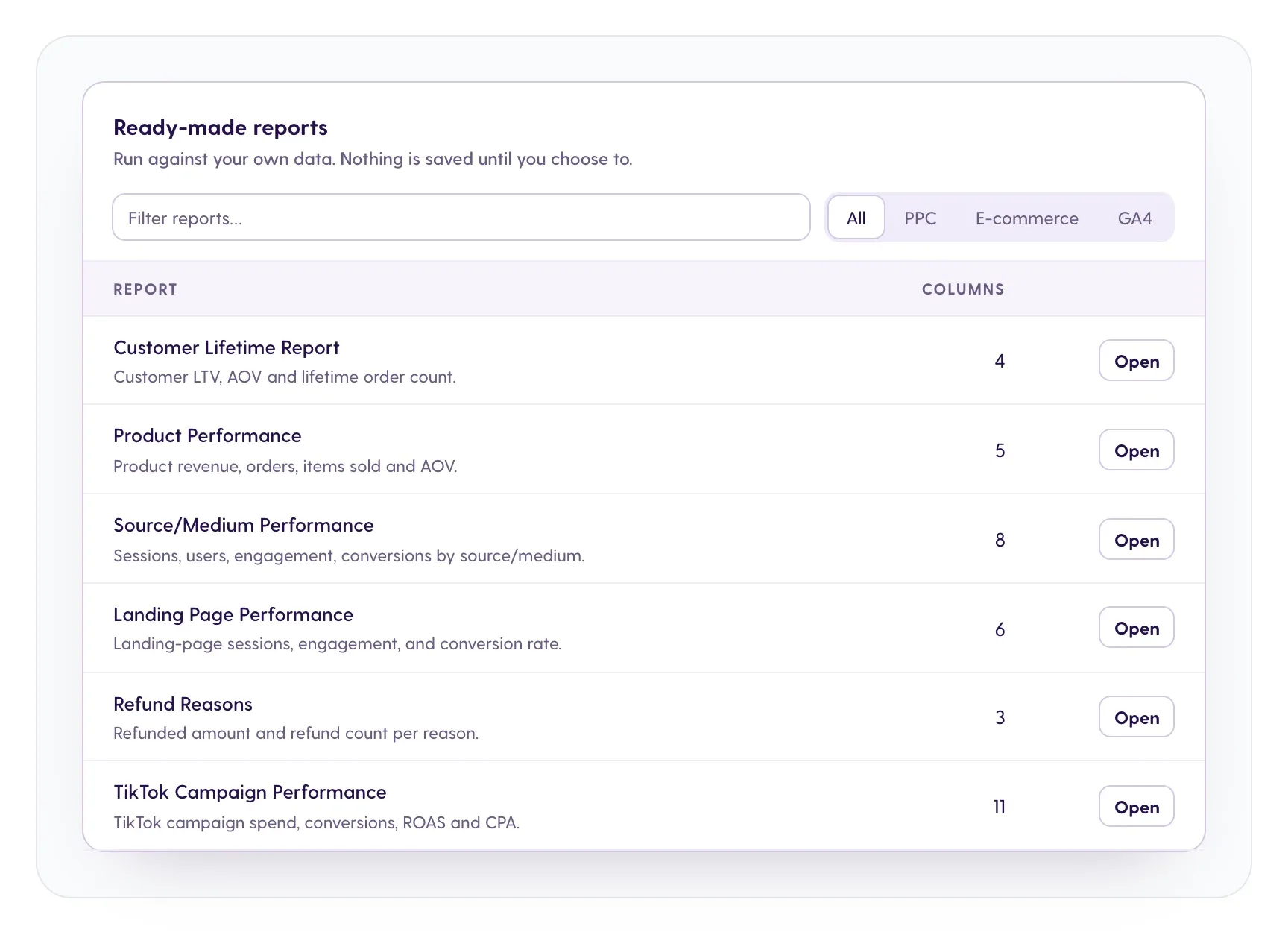
Meerkads Reports come with ready-made templates built for performance marketing and ecommerce, including Customer Lifetime, Product Performance, Source/Medium, Landing Page, Refund Reasons and TikTok Campaign Performance. You can filter them by PPC, ecommerce or GA4 and open them as soon as your data syncs.
Reports can be scheduled for daily, weekly or monthly delivery, exported as PDF or shared as a live link. The Weekly Performance Digest, for example, puts total revenue, marketing spend and blended ROAS with MER on one page, which is often exactly what a founder or client wants on Monday morning.
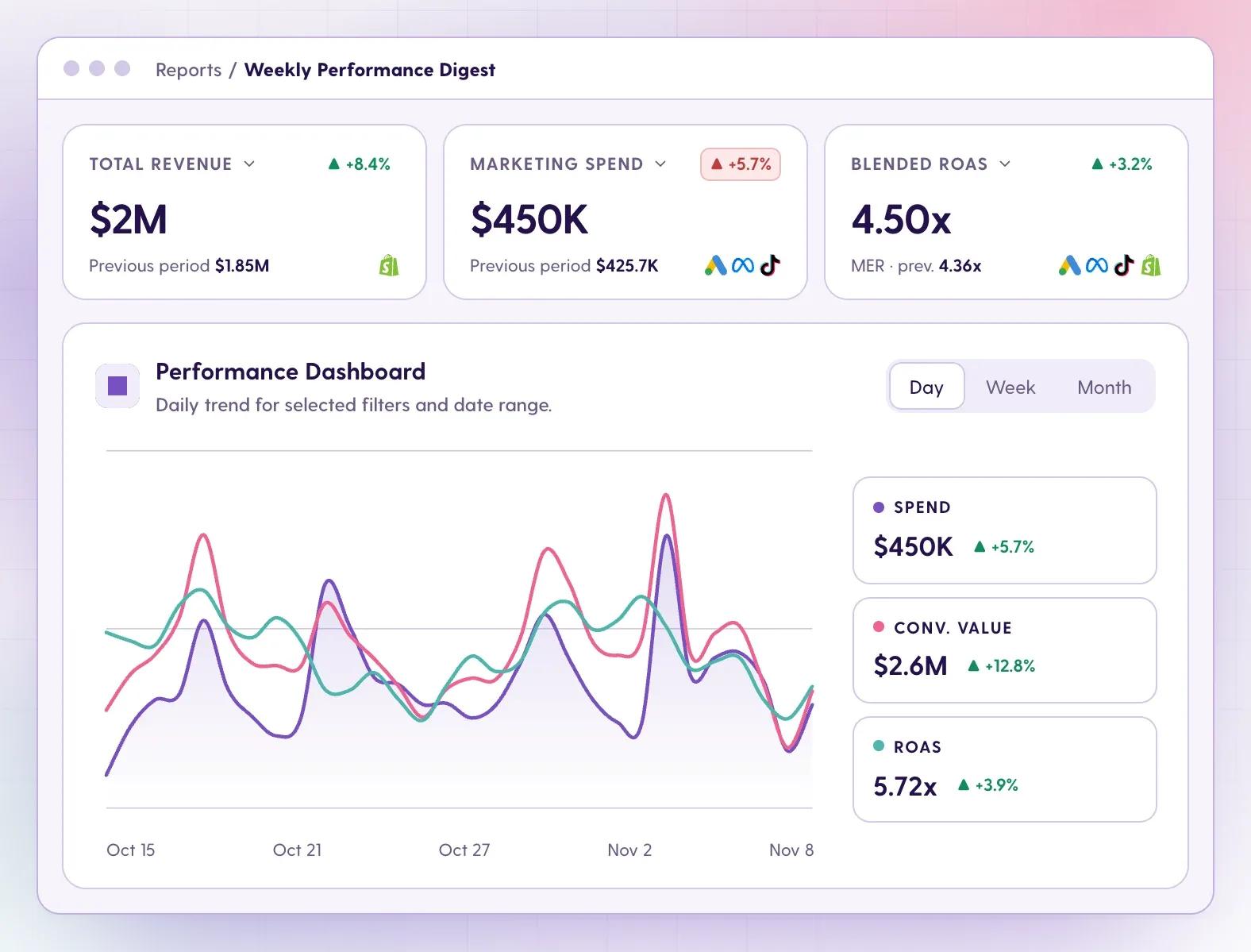
If you prefer to arrange things yourself, Dashboards let you build custom views or start from templates, with real-time data.
Cross-channel performance and store revenue in one place
Looker Studio for marketing works best when every channel is connected. Meerkads connects Google, Meta, TikTok and Shopify natively, then lines spend up against real sales.
Meerkads has six live integrations today: Google Ads, Meta Ads, TikTok Ads, Shopify, GA4 and Google Search Console. More channels and stores are on the roadmap; the integrations page shows what is live and what is planned. That is far fewer sources than Looker Studio's connector ecosystem, so if you depend on a niche platform, check the list first.
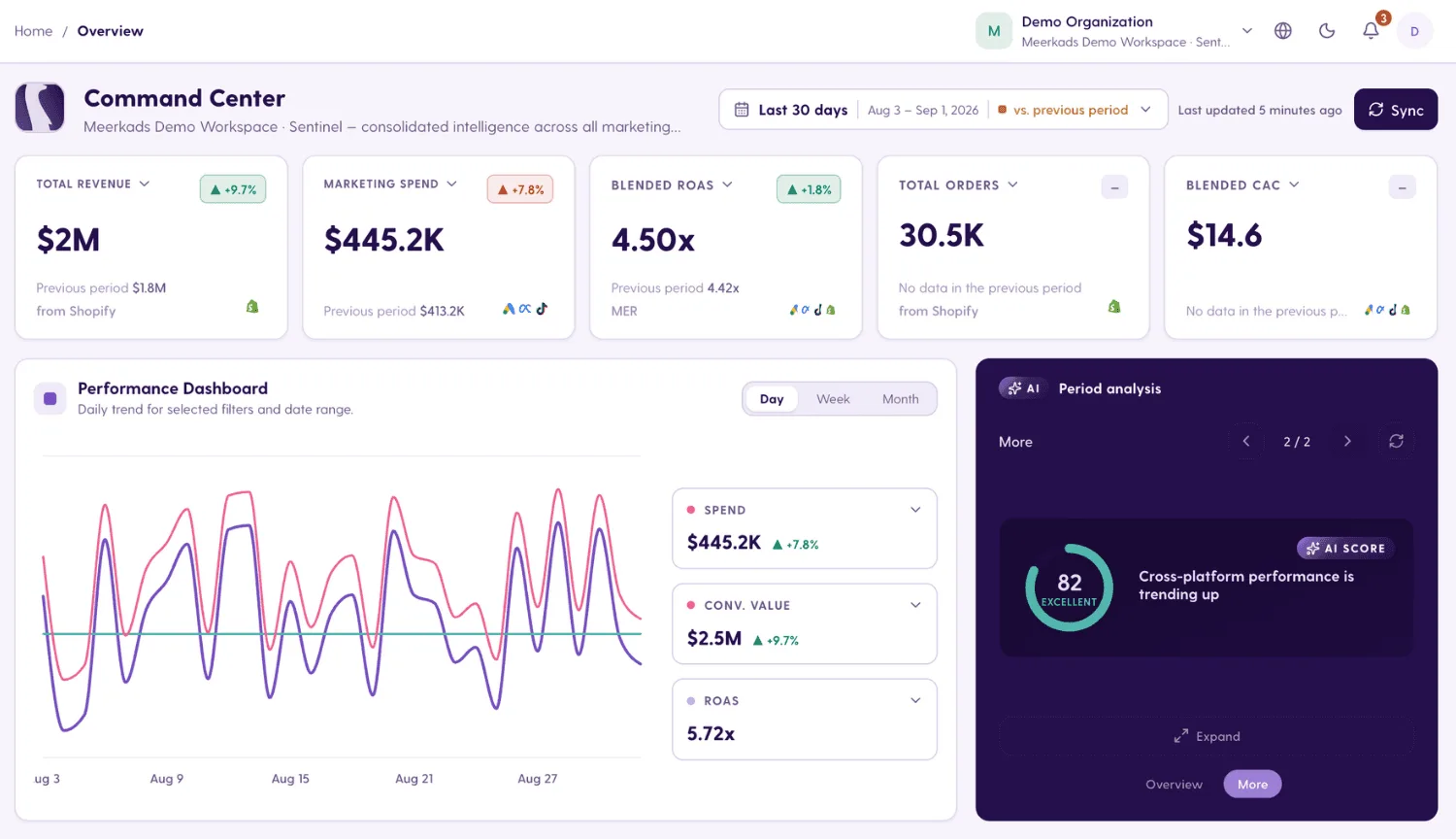
What you get in exchange is depth for the channels most ecommerce teams actually spend on. The Command Center brings revenue, spend, ROAS, orders and CAC into one row of cards, and cross-channel analysis puts ROAS, CPA, CTR and spend side by side at campaign, ad set, ad and product level.
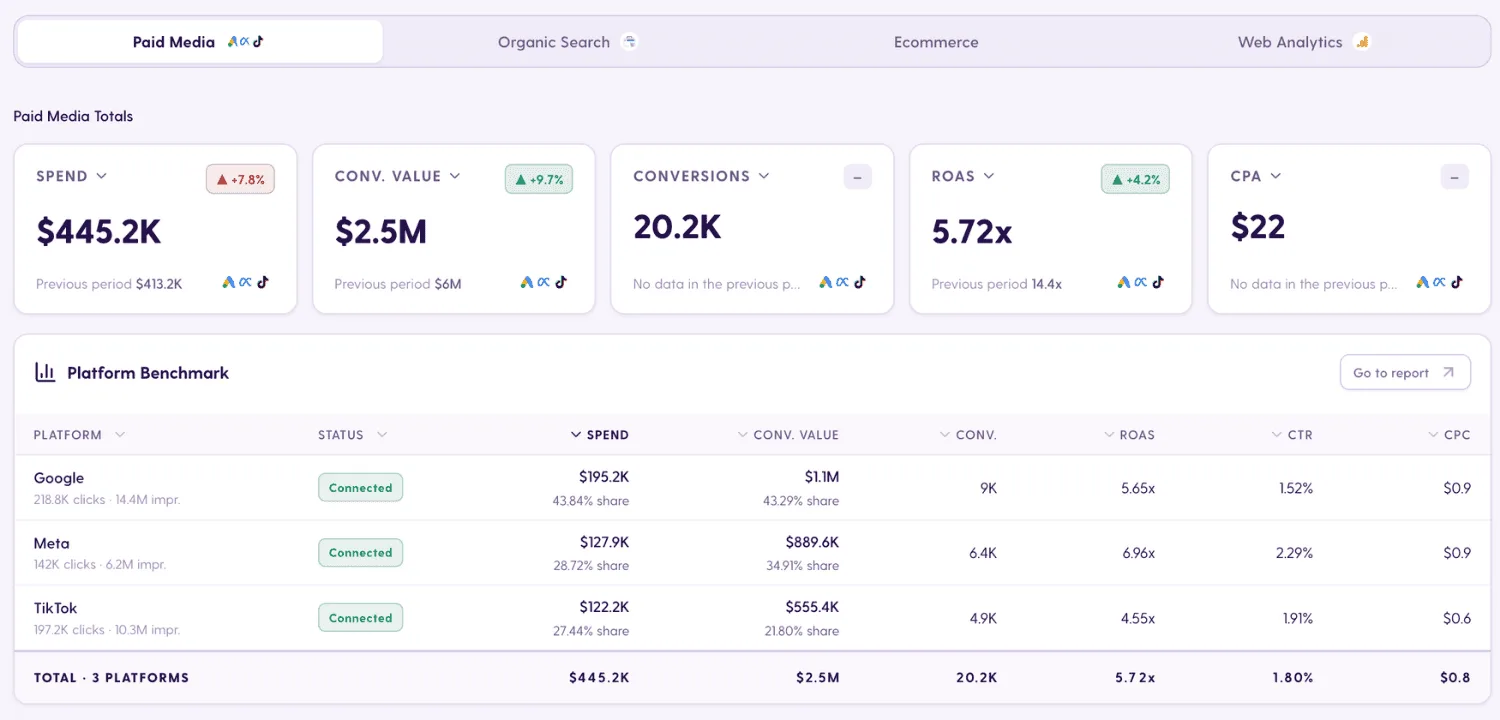
The platform benchmark table compares Google, Meta and other platforms on the same metrics, so you are not toggling between tabs or reconciling different date settings.
The part that is hardest to rebuild in Looker Studio is the link to store revenue. Meerkads matches ad spend with real Shopify sales, including product revenue, refunds and cost of goods, so you see blended ROAS and MER instead of relying only on what each ad platform reports. The ecommerce vs marketing performance view shows revenue, spend and blended ROAS next to Shopify store performance.
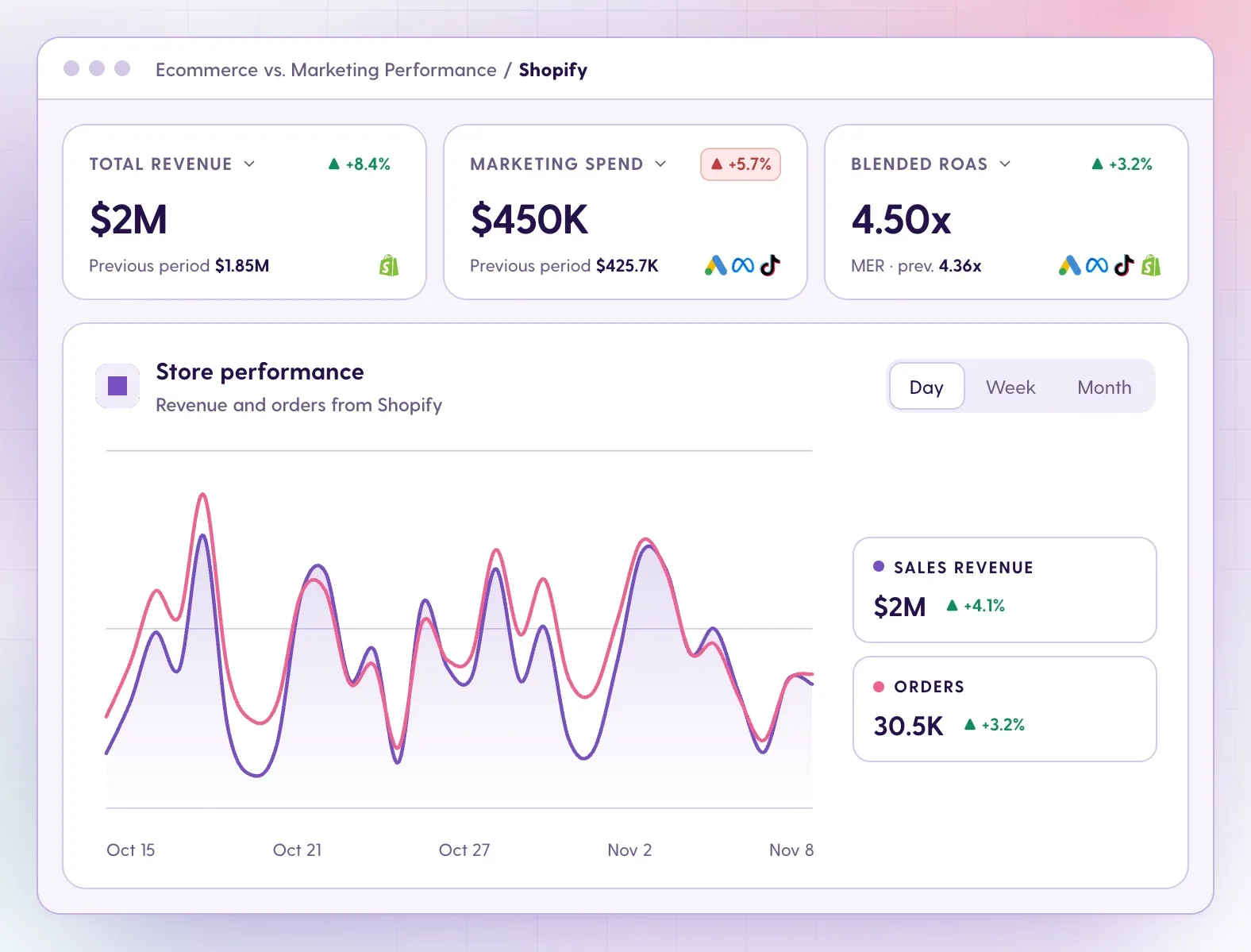
To be clear about scope: Meerkads does not use its own tracking pixel or a multi-touch attribution model. It works from your ad platform and store data, which keeps setup light.
AI analysis, anomaly alerts and recommendations
A dashboard tells you what happened. Meerkads also flags what changed, explains why it matters and suggests what to do next.
With Looker Studio, analysis happens in your head: you open the report, compare periods and spot the drop. Meerkads adds a layer on top of the data:
You can also connect Meerkads to Claude or ChatGPT through MCP and ask questions answered from your own data. The connection is read-only and included in plans.
Client sharing and white-label reporting for agencies
Sharing a Looker Studio report is easy. Making it look like your agency's product and keeping dozens of them current is the hard part.
Meerkads dashboards can be shared as white-label, read-only links: your logo and colors, and no login needed for viewers. Scheduled reports carry the same branding, as PDF or live link. See client reporting for the full workflow.
For agencies managing many brands, the portfolio Weekly performance view shows every account at once: which brands need attention and why, which accounts are left out of totals because of a broken connection or missing data, ROAS by brand and by account manager, and 12-week trends. Building that across clients in Looker Studio would mean one blended report per client plus a roll-up you maintain by hand. More on this on the agencies page.
What it costs, and when to keep both
Looker Studio is free to start, but the real cost depends on connectors, Pro seats and your team's time. Meerkads is priced per brand with everything included.
Looker Studio (Data Studio): free for creators and viewers. Data Studio Pro costs $9 per user per project per month, varying with subscription length, and adds team workspaces, scheduled delivery to Chat or Slack, chart alerts and Gemini features. Google connectors are free; third-party connectors for Meta, TikTok or Shopify may each add a subscription. Then add the hours spent building and fixing reports.
Meerkads: priced per brand, with all live integrations included and no separate connector fees. Scout is $49 per month for tracking, ready-made and custom reports, ecommerce data and a shareable dashboard. Sentinel is $149 per month and adds AI analysis, performance scoring, alerts, report automations, custom branding and white-label dashboards. Both come with a 7-day free trial; details on the pricing page.
If you only report on Google data and have time to build, Looker Studio will be cheaper. If you are paying for several connectors and spending hours each week on reports, the comparison often looks different.
Can you use Looker Studio and Meerkads together?
Yes, and many teams should. Use Meerkads for daily performance decisions: monitoring, alerts, AI recommendations and client-ready reports across ads and store. Keep Data Studio for custom BI work, such as one-off analyses, BigQuery models or embedded reports that need full flexibility. The two cover different jobs.
FAQ
Common questions from teams comparing Looker Studio alternatives.
Is Looker Studio now called Data Studio?
Yes. Google has renamed Looker Studio back to Data Studio, and the paid tier is now Data Studio Pro. The product is the same, so any guide or alternative to Looker Studio also applies to Data Studio.
What is the best Looker Studio alternative for marketing?
It depends on the job. For ecommerce brands and agencies running Google, Meta and TikTok ads with Shopify, Meerkads gives you ready-made reports, store revenue next to ad spend, AI recommendations and alerts without building anything. If you need custom BI across many data sources, Data Studio remains a strong free option.
Do I need paid connectors for Meta, TikTok or Shopify in Meerkads?
No. Meta Ads, TikTok Ads and Shopify are native Meerkads integrations, included in every plan alongside Google Ads, GA4 and Google Search Console.
Can I try Meerkads before switching from Looker Studio?
Yes. Every plan has a 7-day free trial and you can cancel anytime. You can keep your existing Data Studio reports running while you compare.
Key differences
How Meerkads differs from Looker Studio
No reports to build or maintain
Ready-made marketing and ecommerce reports and dashboard templates work as soon as your accounts sync, instead of a blank canvas.
Native Meta, TikTok and Shopify
Connect Google Ads, Meta Ads, TikTok Ads, Shopify, GA4 and Search Console natively, without paying for third-party connectors.
Ad spend vs real store revenue
Blended ROAS and MER against Shopify sales, including refunds and cost of goods, without blending data or writing calculated fields.
AI analysis with next steps
Plain-language findings, each with a suggested action, plus AI performance scoring for campaigns and creatives.
24/7 monitoring and anomaly alerts
Thresholds for spend, ROAS, CPA and conversions, plus pattern-based anomaly detection that catches what you did not set a rule for.
White-label client sharing
Branded, read-only dashboard links with no viewer login, and scheduled white-label reports as PDF or live link.
Pricing
Pricing that scales with you.
Looker Studio is free, with Data Studio Pro at $9 per user per project per month plus any third-party connector fees. Meerkads starts at $49 per brand per month with all live integrations included and a 7-day free trial.
Black Friday · Cyber Monday
50%off every plan
Our biggest discount of the year: 50% off Scout and Sentinel, monthly or yearly. Use the code at checkout before November 30.
BFCM2026
Ends in
-
Scout
Track & Monitor
$40.80-50%$20.40/month
per brandwith code BFCM2026
$245 billed yearly · 2 months freeBilled monthly · cancel anytime
Get startedTry 100% free for 7 days. Cancel anytime.
- All channels connectable
- Campaign, ad & product performance
- Prebuilt & Custom Reports
- Ecommerce data
- Live data sync
- Sharable dashboard (read-only)
- Standard onboarding
-
SentinelMost Popular
AI Ad Performance & Asset Analysis
$124.10-50%$62.05/month
per brandwith code BFCM2026
$745 billed yearly · 2 months freeBilled monthly · cancel anytime
Get startedTry 100% free for 7 days. Cancel anytime.
- Everything in Scout
- AI-based ad performance analysis
- AI analysis of ad assets
- Creative fatigue detection
- Audience performance analysis
- Custom branding
- AI performance scoring
- Report automations & alerts
- White-labeled sharable dashboards
-
HunterComing soon
AI Optimization, Creation & Engagement
Stay Tuned for More
Get notified when Hunter launches.
- Everything in Sentinel
- One-Click AI Ad Strategy Setup
- AI-driven budget optimization
- AI ad text generation
- AI image generation for ads
- AI-powered comment management
- White-labeled sharable dashboards
- Ads automation rules & alerts
- Competitor analysis
- Live onboarding
Not sure which plan fits? Compare plans to find the right fit for your brand or agency.
7-day free trial
Ready to take control of your ad performance?
Connect your ad channels and ecommerce store in one platform. AI analyzes performance, detects anomalies, and surfaces recommendations so you can grow faster.